
Premium Home Projector: Choose the Right Cinema Experience in 2026
More resolution doesn’t automatically mean a better fit for your room. A premium home projector should deliver the viewing experience you want while working with your space, screen, and everyday habits. That’s why comparing 4K and 1080p is only part of the decision.
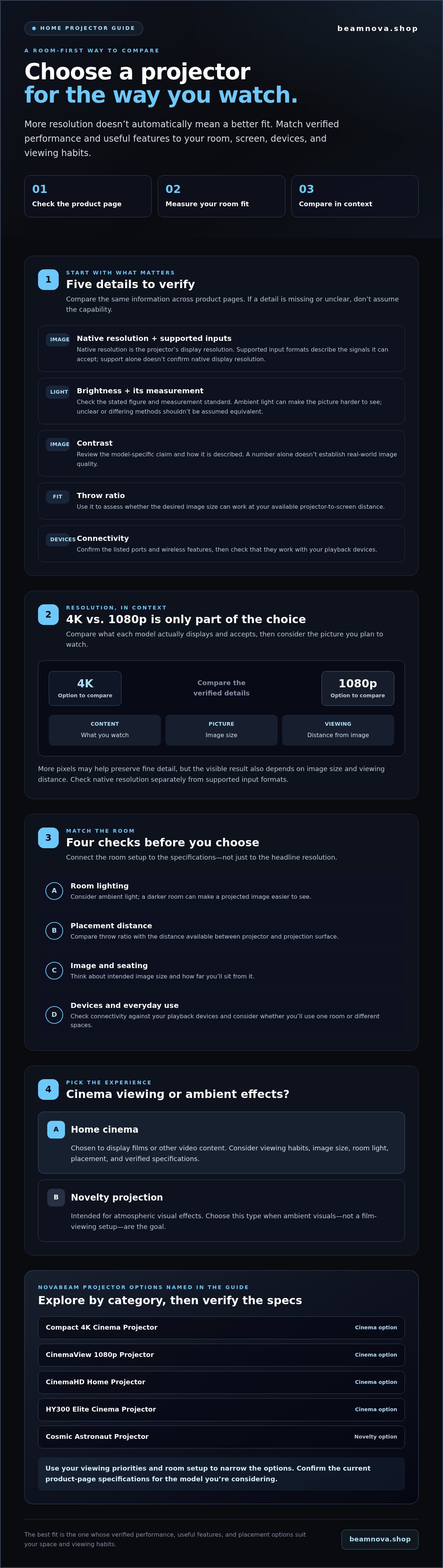
It’s easy to get lost in specification sheets or wonder whether a projector will look bright enough in your living room, fit the available throw distance, or make a noticeable difference for your favorite films and games. Focus on the details that connect performance to how and where you watch. Check native resolution, supported input formats, brightness, throw ratio, and connectivity, then compare them with your room and devices.
This guide explains which features matter and what to verify on each product page before buying. It also introduces NovaBeam’s projector options, from the Compact 4K Cinema Projector and CinemaView 1080p Projector to the CinemaHD Home Projector, HY300 Elite Cinema Projector, and Cosmic Astronaut Projector. Use your viewing priorities and room setup to narrow the choices, rather than relying on headline specs alone.
Key Takeaways
- Judge a premium home projector by how its verified performance and useful features suit your viewing space, not by resolution alone.
- Check product pages for native resolution, supported input formats, brightness, throw ratio, and connectivity.
- Compare 4K and 1080p in context, considering your content, screen size, and viewing distance.
- Assess viewing space, ambient light, placement, and projector specifications before choosing.
- Explore NovaBeam’s confirmed projector categories and shortlist options according to your room and viewing priorities.
What Makes a Premium Home Projector Worth Considering?
A premium home projector is one whose verified performance, useful features, and placement options suit your room and viewing habits. The label alone won’t tell you whether the image will look right on your wall or screen. Resolution matters, but so do brightness, image size, viewing distance, and room lighting.
Use those details to turn a specification sheet into a practical comparison. For background on how projection systems create and display images, explore video projector technology. For a specific model, verify its current product-page specifications rather than assuming a premium description guarantees a particular result.
Which projector details shape the viewing experience?
Resolution describes the amount of image detail a projector can display. More pixels may help preserve fine detail, but the result also depends on image size and how far away you sit. Limitations can be more noticeable when you view a large picture from close up than when you view a smaller picture from farther away.
Brightness affects how clearly the picture holds up in different lighting. A darker room can make a projected image easier to see, while ambient light may wash out detail. Check the brightness figure and the measurement used on each product page. If the measurement basis isn’t clear or differs between listings, don’t assume the figures are directly comparable.
Also check whether a specification refers to a projector’s native resolution or the formats it supports as input. These describe different things: support for an input format doesn’t confirm the projector’s native display resolution. Check both before deciding what image detail to expect.
Is a premium projector right for your home?
Start with how you’ll use it. Movie nights and shared viewing may call for a larger projected picture and a room where you can manage light. If you plan to use the projector in different spaces, placement and available wall space may matter more. In either case, compare your intended image size with the distance from the projector to the projection surface and from your seats to the image.
There’s a difference between a cinema experience and decorative ambient lighting. A home cinema projector is chosen to display films or other video content; a novelty projector is intended for atmospheric visual effects. NovaBeam’s catalog includes both home cinema options and novelty projection devices, including the Cosmic Astronaut Projector. Choose according to the experience you want, then confirm the relevant specifications before purchase.
Which Premium Home Projector Features Should You Compare?
Start with verified specifications, not a headline label. A premium home projector should match your source devices and room, so compare the same details across product pages. If a specification isn’t listed or its meaning is unclear, don’t assume the projector includes that capability.
- Resolution: Look for native resolution, then note which input or playback formats the projector accepts.
- Brightness: Check the stated figure and its measurement standard. Room lighting affects how visible the projected image appears.
- Contrast: Review the model-specific claim and how it’s described. Don’t infer real-world image quality from a number alone.
- Throw ratio: Use this to assess whether the projector can create your desired image size from your available placement distance.
- Connectivity: Confirm the listed ports and wireless features, then check that they work with your playback devices.
For a broader introduction to projection concepts, wikipedia.org offers general background. For more focused context, see this guide to the compact 4K cinema projector.
How should you compare resolution and brightness?
Native resolution describes the projector’s display resolution. Supported input formats describe the signals it can accept. Accepting a particular format doesn’t, by itself, mean the projector displays that signal at the same native resolution. Check both fields on the product page, especially when comparing 4K and 1080p options.
Brightness needs context. Ambient light may make a projected picture harder to see, while controlled lighting changes the viewing conditions. Compare brightness figures only when the product pages clearly state how they’re measured. Don’t treat different or unspecified measurement methods as equivalent. Verify each model’s figure before drawing conclusions.
What connectivity and compatibility details matter?
Check the exact input ports and any listed wireless features, then compare them with the devices you plan to use. A laptop, console, or other playback device may require a particular connection or supported signal format. Confirm compatibility with your setup before buying, including whether you may need any additional accessories.
Also distinguish projector connectivity from access to content. A port or smart feature doesn’t establish that a paid streaming subscription is included. NovaBeam’s product pages are the place to review confirmed model details, including those for the Compact 4K Cinema Projector, before deciding which specifications fit your setup.
4K vs. 1080p: Which Premium Home Projector Fits Your Priorities?
Choosing a premium home projector isn’t a contest where the highest resolution automatically wins. Think about the films and shows you watch, how large you want the picture, and how far you’ll sit from it. Those factors help you decide whether 4K detail matters for your setup or whether 1080p is a better match.
| Consideration | 4K | 1080p |
|---|---|---|
| Image detail | May suit you if you’re seeking finer detail, particularly when your content and viewing setup let you appreciate it. | Provides Full HD resolution, which may suit your viewing habits and content needs. |
| Viewing context | Consider it for a large projected image or seating closer to the screen, then assess whether the difference matters to you. | Consider it if the planned image size, viewing distance, and content make Full HD a suitable fit. |
| What to verify | Check native resolution and supported input formats on the product page. | Confirm native resolution and supported formats, along with the model’s other specifications. |
The table is a starting point, not a guarantee of how a picture will look. For more detail on choosing a 4K option, read the 4K home theater projector buying guide. As you research display formats, you can also consult this resolution reference alongside each product’s specifications.
When might a 4K projector make sense?
If finer image detail is a priority, 4K may be worth exploring, especially if you plan a large picture or sit close enough to notice differences. Check whether the listed resolution is native and which signal formats the projector accepts. Support for a 4K input alone doesn’t establish native 4K resolution. NovaBeam’s Compact 4K Cinema Projector is a confirmed catalog option. Review its current product page to verify the details before deciding.
When can a 1080p projector be the practical choice?
Full HD may fit well if it aligns with the content you watch, your intended image size, and your seating distance. It can be a considered choice when those priorities don’t call for 4K. NovaBeam’s CinemaView 1080p Projector is another confirmed option to compare. Check its product page for current specifications, and explore the NovaBeam projector options to assess which category suits your viewing plans.
How Do You Match a Premium Home Projector to Your Room?
A projector can have appealing specifications and still be a poor fit if the picture won’t suit your room. Before choosing a premium home projector, check the space as carefully as the product page. This four-step review connects your viewing plans to model-specific details without getting into a full installation process.
- Measure the viewing space. Note the distance from the projector’s intended position to the wall or screen, plus the width and height of the surface you plan to use.
- Assess the light. Consider whether you’ll watch with daylight, room lights, or mostly in a darkened space.
- Confirm placement. Account for seating, furniture, power access, and whether the projector needs to move between rooms.
- Verify the specifications. Compare your measurements with the model’s stated throw ratio and supported image-size range. Review its listed brightness information, too.
These checks can help you rule out mismatches early. For a deeper room-focused selection process, see the compact projector space guide.
What should you measure before choosing?
Start by measuring from the likely projector position to the intended projection surface. Then measure the usable wall or screen area and note where viewers will sit. The same projected image can feel different depending on its size and how far away the audience is, so consider both measurements together.
If you expect to move the projector between rooms, note how those spaces differ. A model’s throw ratio and image-size range determine which combinations of distance and picture size it supports. Check those figures on the specific product page. Don’t assume every projector can fill the same space from the same position.
Will the room be bright or dark during viewing?
Ambient light can affect how visible a projected image appears. Think about your usual viewing conditions: can you dim the lights or reduce daylight, or will the room stay bright? Your answer helps you interpret brightness specifications in context, but it doesn’t replace checking the model’s verified figures and measurement details.
Keep this assessment practical. Compare brightness information across product pages only when the figures are clearly stated and measured on a comparable basis. If a listing uses a vague brightness label without explaining the figure, don’t treat it as a reliable comparison.
Once you’ve measured your space, explore NovaBeam’s projector options and check each model’s current specifications against your room and viewing plans.
Which NovaBeam Projector Should You Explore Next?
Your shortlist should reflect what matters most: resolution, room and viewing distance, how you’ll use the projector, and whether you want cinema viewing or decorative light. NovaBeam’s catalog includes several projector categories, but a product name alone doesn’t confirm how a model will perform in your space. Use names to identify options, then compare current specifications before choosing a premium home projector.
How can you shortlist the right NovaBeam category?
If you’re prioritizing a 4K option, start with the Compact 4K Cinema Projector and verify its native resolution and supported formats. If Full HD fits your content and viewing plans, consider the CinemaView 1080p Projector. The CinemaHD Home Projector and HY300 Elite Cinema Projector are also confirmed catalog options. Check their product pages rather than assuming specifications from their names.
Compactness may matter if you’re considering different viewing spaces, but confirm each model’s dimensions and other relevant details before relying on it for room-to-room use. Keep your purpose clear, too. The Cosmic Astronaut Projector is an ambient-lighting option for decorative effects, not a substitute for a cinema projector selected by resolution, throw, and image-size specifications.
What should you confirm before placing an order?
Before settling on a model, review its current product page and check the details that matter to your setup:
- Image and placement: Verify native resolution, supported input formats, throw ratio, and stated image-size range.
- Viewing conditions: Check brightness and contrast information, including how any figures are measured.
- Your devices: Review listed ports and wireless features, then confirm compatibility with the playback devices you plan to use.
- What’s included: Check the listed accessories and included items instead of assuming they come in the box.
- Delivery: Review shipping information for your destination before checkout.
This final check helps you compare model details with your room, content, and viewing habits. It also keeps category labels from standing in for information that should be verified directly.
Ready to compare the confirmed options? Explore NovaBeam’s projector catalog at your own pace and choose the model whose verified details best match your plans.
Make Your Next Movie Night a Better Fit
The right premium home projector is the one that fits your viewing priorities and the room you’ll use it in. Let your content and preferred image size guide the 4K or 1080p decision, then check model specifications against your space and devices before choosing.
NovaBeam’s catalog includes compact 4K and 1080p projector categories, available directly through its online store. If your goal is decorative atmosphere rather than movie viewing, the Cosmic Astronaut Projector offers a separate ambient-lighting option. Keeping those purposes distinct can make your shortlist clearer.
Before ordering, review each product page for verified specifications, included items, compatibility, and shipping information for your destination. Then explore at your own pace: Explore NovaBeam home projectors.
Your ideal setup starts with a thoughtful match between the room, the picture you want, and the way you watch. Choose a model based on its verified details and make space for a more immersive home viewing experience.
Frequently Asked Questions
What makes a home projector premium?
A premium home projector combines verified performance, useful features, and a good fit for your room and viewing habits. The label alone doesn’t guarantee a particular image or experience. Consider how resolution, brightness, contrast, placement requirements, and connectivity work together for your setup. Also distinguish a cinema projector, designed for video viewing, from a novelty projector intended to create decorative ambient effects.
Is a 4K projector better than a 1080p projector for home movies?
Not automatically. A 4K projector may suit viewers seeking finer image detail, while 1080p can meet the needs of viewers whose content, screen size, and seating distance don’t call for 4K. Compare native resolution, not just accepted input formats, and consider how close you’ll sit to the projected image. The right choice depends on your viewing priorities and verified model specifications.
Can a home projector work in a bright room?
It can, but ambient light may make a projected image less visible or reduce the impression of contrast. Consider whether you can dim room lights or limit daylight during viewing. Then check the specific projector’s brightness information and measurement basis. Avoid relying on vague labels or comparing figures that may use different measurement methods. Your room conditions matter alongside the product’s stated specifications.
How do I choose the right projector for my room?
Measure the distance from the planned projector position to the projection surface, the usable surface area, and the seating distance. Consider furniture, room lighting, and whether you want to move the projector between spaces. Compare your measurements with the model’s verified throw ratio and image-size information. This check helps you assess room fit before purchase without assuming every projector works at the same distances.
Does a 4K projector need 4K content?
No, not necessarily, but check the model’s supported input formats and playback compatibility before connecting a source. A projector may accept different signal formats, but accepted input doesn’t by itself tell you the image’s native display resolution or how lower-resolution content will appear. Review the product specifications and your playback device’s output settings to confirm which formats your setup can use.
Can I use a projector for streaming services?
You can watch streamed video through a compatible playback device if the projector supports the connection and signal format that device needs. Check the projector’s listed ports or wireless features, and verify compatibility with your equipment. Streaming access depends on the playback device and the relevant service account. NovaBeam sells projector hardware, not streaming-service subscriptions, so access to paid services must be arranged separately.
What should I check before buying a premium home projector?
Before choosing a premium home projector, review the product page for native resolution, supported input formats, brightness, contrast, throw ratio, connectivity, and included accessories. Check compatibility with your source devices and compare placement details with your room measurements. Confirm any other product or shipping information relevant to your order directly on the current listing. Don’t infer a specification or included item from a product name alone.