
Compact 4K Cinema Projector: How It Works and What to Know
What if “4K” on a projector’s box doesn’t mean the picture comes from a native 4K chip? Choosing a compact 4k cinema projector can feel straightforward until you compare labels that describe different image capabilities. It’s reasonable to want crisp detail in a space-conscious design, but the result also depends on how the projector creates its image and the room where you’ll watch.
This guide explains what compact 4K projectors can deliver and how to assess whether one fits your viewing habits. You’ll learn the difference between native 4K resolution and 4K signal support, why brightness measurements and viewing distance matter, and which specifications offer useful information. We’ll also cover trade-offs between portability, image size, and performance, along with product-page details to check before buying. NovaBeam offers a Compact 4K Cinema Projector. Review its exact listing rather than assuming what its name means. By the end, you’ll have a practical way to judge the projector’s image capabilities and fit for your room.
Key Takeaways
- Judge a compact 4k cinema projector by its documented image capabilities and how well it fits your room, not by its label alone.
- Check how the projector creates its image and what resolution it displays before comparing 4K claims.
- Match brightness, screen size, and placement to your viewing space, especially if you watch with ambient light.
- Use a checklist to separate useful performance details from convenience features and promotional wording.
- NovaBeam offers a product in this category. Review the product listing to see whether its specifications suit your setup.
What Is a Compact 4K Cinema Projector, and What Does “4K” Mean?
A compact 4K cinema projector is designed to create a large projected image in a space-conscious form. “Compact” describes its physical size, not a guaranteed level of portability. One model may be easy to move, while another may be better suited to a regular spot in the room. “4K,” by contrast, refers to image resolution. These terms describe different things, so neither tells you the whole story about performance.
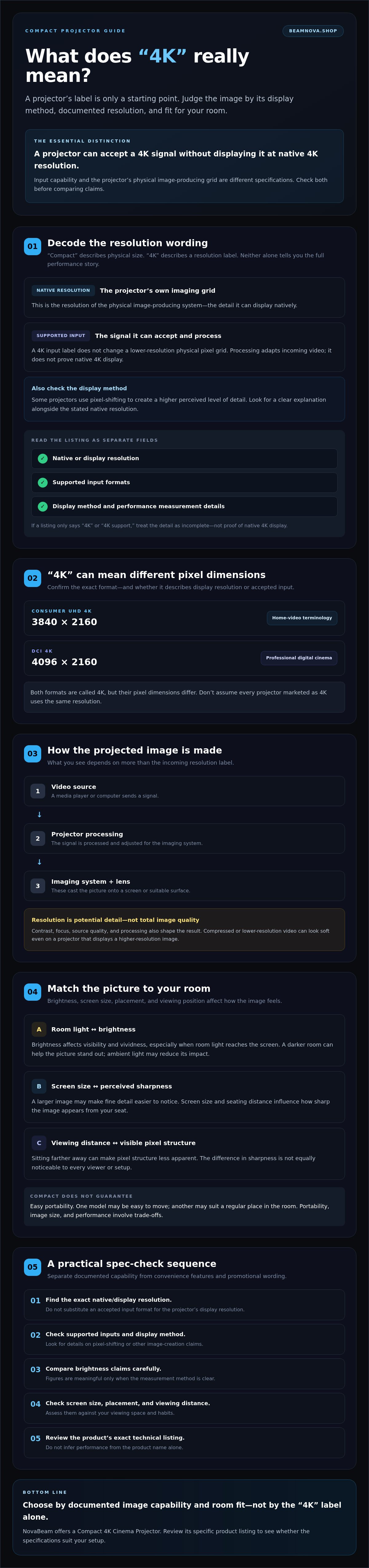
Native resolution is the resolution of the projector’s physical imaging grid. Supported input resolution describes the video signal it can accept and process. A projector can accept a 4K signal without displaying it at native 4K resolution. Check both details in the product’s technical specifications before comparing models.
Native 4K vs. 4K-supported: what appears on screen?
Think of native resolution as the projector’s own grid of image-producing pixels. If a source sends a 4K signal to a projector with a lower native resolution, the projector can process that signal, but the input label doesn’t change its physical pixel grid. Some projectors use pixel-shifting to create a higher perceived level of detail. Check for a clear explanation of the display method as well as the stated native resolution.
Product wording can blur these distinctions. Look for separate entries for native or display resolution and supported input formats. If a listing only says “4K” or “4K support,” treat that as incomplete information, not proof of native 4K display.
UHD 4K and cinema 4K are not identical labels
Consumer UHD 4K commonly refers to 3840 × 2160 pixels. DCI 4K, used in professional digital cinema, refers to 4096 × 2160 pixels. The formats have different pixel dimensions, even though both are called 4K. The overview of 4K resolution explains the distinction. Consumer home-video discussions generally use UHD terminology.
Don’t assume every projector marketed as 4K uses the same resolution. Confirm the exact pixel dimensions and whether they describe the projector’s native display or an accepted input format. NovaBeam offers a Compact 4K Cinema Projector. Review the specific product listing for its technical details.
Resolution is only one part of the viewing experience. Brightness affects how well the picture holds up in your room, contrast shapes the difference between dark and bright areas, and source quality influences the detail available to display. Screen size and viewing distance also affect how sharp the image appears from your seat. A compact 4k cinema projector may suit your needs, but its label alone can’t predict whether it will deliver the picture you want. Compare the full specification set with your room and viewing habits.
How a Compact 4K Projector Creates a Cinema-Style Image
A projector turns video into a picture through a chain of steps. A source, such as a media player or computer, sends a video signal to the projector. The projector processes that signal, adjusts it to suit its imaging system, and uses that system and a lens to cast the picture onto a screen or suitable surface. Each step can shape what you see, so a resolution label alone can’t describe the final image.
A 4K input cannot guarantee a native 4K image because the projector’s imaging system determines the resolution it displays. Processing can adapt incoming video, but the input label is not a substitute for documented native resolution. For any compact 4k cinema projector, check the technical documentation for the display method, supported input formats, and measurement methods behind performance claims.
Resolution, pixels, and perceived detail
Resolution describes how many pixels make up an image. UHD 4K at 3840 × 2160, for example, contains more than eight million pixel positions. That count describes potential detail, not overall image quality. Contrast, focus, source quality, and processing also matter. A highly compressed or low-resolution video can look soft even on a projector that displays a higher-resolution image.
Screen size and seating distance influence perceived sharpness. A larger image may make fine detail easier to notice, while sitting farther away can make pixel structure less apparent. The difference won’t be equally noticeable to every viewer or in every setup, so consider your usual screen size and viewing position instead of assuming a higher resolution will always look sharper.
Brightness, contrast, and HDR in a projected image
Brightness affects how visible and vivid the image appears, particularly when room light reaches the screen. A darker room can help the picture stand out, while ambient light may reduce its impact. Compare brightness claims carefully: figures are meaningful only when you know the measurement method and units. The manufacturer’s documentation can clarify how a model’s rating was measured.
Contrast describes the separation between darker and brighter parts of a picture. It influences whether shadows retain depth while highlights remain distinct. HDR support means a projector can accept or process HDR content, but that doesn’t establish how effectively it reproduces HDR. Look for documented HDR formats and performance details, including whether dynamic tone mapping is specified. “Cinema-style” describes a viewing experience. It doesn’t prove that a home projector meets professional digital cinema specifications established by Digital Cinema Initiatives (DCI).
Assess the full image chain, not just headline claims. If you’re comparing options, review NovaBeam’s Compact 4K Cinema Projector listing and check its specifications against your needs.
Compact 4K Projector Trade-Offs: Brightness, Image Size, and Portability
A compact projector can bring a generous picture to a home without requiring a dedicated cinema room, but its size alone won’t tell you how it performs. Consider portability, room lighting, desired image size, and available placement together. A cinema-style experience can be immersive, but no projector can guarantee the same result in every room as a dedicated theater.
| Factor | Potential trade-off | What to check |
|---|---|---|
| Portability | A smaller form may be easier to move, but compactness doesn’t confirm weight or ease of setup. | Dimensions, weight, and what the product listing says about moving or positioning it. |
| Room light | Ambient light can make projected images appear less vivid. | Brightness measurement, units, and measurement method. |
| Image size | A larger picture may require more projection distance and can make limitations in brightness or focus more apparent. | Supported image sizes and throw ratio. |
| Placement flexibility | Lens design and room layout can limit where the projector sits and where the image lands. | Throw ratio and any documented lens or positioning adjustments. |
Does a compact projector work in a bright room?
Ambient light reduces the perceived visibility of a projected image by washing out its contrast and making bright details seem less vivid. Dimming lights, choosing a room with controllable daylight, and avoiding direct light on the screen can help. There isn’t one brightness threshold that suits every setup. Screen size, wall or screen surface, and room conditions all matter. Where available, compare independently documented brightness measurements, and check whether figures use ANSI lumens, ISO lumens, or another stated method.
How portability and throw distance affect room fit
Throw ratio describes the relationship between the distance from the projector lens to the screen and the width of the projected image. A projector’s lens design affects how far away it needs to sit for a chosen image size. Your room’s depth and furniture layout can therefore determine whether the picture you want is practical. Check the manufacturer’s stated throw ratio and image-size range before assuming a unit will fit. For background on resolution labels and picture formats, see 4K resolution explained by Dolby.
When considering a compact 4k cinema projector, compare published specifications with your actual room rather than relying on “cinema” or “portable” wording. NovaBeam offers a product with this category name. Check its brightness, throw ratio, dimensions, and other details on the product listing. This section focuses on choosing for room fit, not installation instructions.
How to Evaluate Compact 4K Projector Claims Before You Choose
Use the same checklist for every model. It helps separate specifications that shape the picture in your room from features that mainly add convenience, and keeps broad category labels from standing in for exact documentation.
Check the specification sheet in a clear order
Start with the image, then check room fit and usability. Look for the manufacturer’s technical details, not just a headline or short product description.
- 1. Intended use: Decide whether you’ll mainly watch films in a dim room, view TV with some ambient light, or use the projector for other content. This sets your priorities.
- 2. Native resolution: Find the stated display resolution and image-generation method. Then check supported input formats and any pixel-processing claims. A 4K input label alone doesn’t establish native 4K display.
- 3. Brightness: Check the units, measurement standard, and test conditions. Don’t compare figures as if they’re equivalent when the listing doesn’t explain how they were measured.
- 4. Room fit: Confirm the throw ratio and supported image-size range, then compare them with your available projection distance and screen size.
- 5. Picture capabilities: Look for documented contrast and HDR details. Treat HDR support and the projector’s ability to reproduce HDR effectively as separate questions.
- 6. Connections and operation: Verify inputs, focus method, and any processing or adjustment features against official model documentation. Decide which convenience features you’ll actually use.
Match projector capabilities to your viewing habits
Your room and routine should guide your shortlist. Consider how much daylight or artificial light is present during viewing, how far you sit from the picture, the image size you want, and which devices provide your content. If you usually watch in a darkened room, room-light performance may be less central than resolution, focus, and placement. For daytime viewing, verified brightness information deserves closer attention.
Separate core performance from persuasive wording. Native resolution, measured brightness, throw ratio, and documented HDR capabilities help you assess the projected image and room compatibility. Terms such as “cinema quality” or “immersive” are not substitutes for those details. Convenience features may matter, but only if they fit how you watch.
NovaBeam offers a Compact 4K Cinema Projector. Check its exact specifications on the product listing rather than inferring them from its name. You can review NovaBeam’s Compact 4K Cinema Projector and compare its stated capabilities with your setup. A broader home-theater buying guide can also help you weigh priorities across projector categories.
Is NovaBeam’s Compact 4K Cinema Projector the Right Category for Your Home?
A compact 4K projector may suit viewers who want a large home-entertainment picture and value a space-conscious format. Whether it’s the right fit depends on the exact model specifications and your viewing environment, not the category name alone. Room layout, available projection distance, seating position, and lighting all shape what the final image can deliver.
When a compact 4K cinema projector may suit your priorities
Consider this category if you’re comparing projectors for films, shows, or other home viewing and want to balance image detail with a manageable form factor. Start with your real room conditions. A bright space calls for closer scrutiny of documented brightness, while limited placement options make throw ratio and image-size details especially relevant. A “4K” label alone can’t confirm that a model meets your resolution expectations.
NovaBeam offers a product named Compact 4K Cinema Projector. Assess its performance using the current product listing and manufacturer documentation, rather than assumptions based on its name.
What to confirm on NovaBeam’s product page
Before deciding, check the details that connect the projector to your needs. Compare the listing’s claims with official documentation, and note any specifications that are missing or unclear.
- Resolution: Confirm native display resolution separately from supported input formats.
- Brightness and HDR: Check brightness units and measurement method, plus the stated HDR formats and capabilities.
- Room fit and connections: Review throw ratio, focus method, and available inputs to see whether placement and your content sources are compatible.
- What’s included: Confirm included accessories and any other practical details you need.
- Purchase details: Check current availability and destination-specific shipping information at checkout.
NovaBeam sells home projectors through its online store and offers international shipping. Check destination-specific details at checkout. Compare the listing with your room, viewing habits, and must-have features. To explore the available options, explore NovaBeam projectors and review each product’s documented details.
Choose a Projector That Fits Your Room
A compact 4k cinema projector can help bring a more immersive viewing experience into your home, but the right choice depends on more than the “4K” label. Check whether the listed resolution is native or describes supported input, compare brightness details with your room’s lighting, and make sure the projector’s placement requirements work with your space. These checks turn broad claims into practical answers about what you’ll see.
NovaBeam’s catalog includes a Compact 4K Cinema Projector, sold directly through its online store. Check the current product listing for the model’s resolution, brightness measurement, connectivity, and other details before deciding. When you’re ready, explore NovaBeam projectors and compare the options with your viewing habits, room, and verified specifications.
Frequently Asked Questions
Is a compact 4K projector truly native 4K?
Not necessarily. “Compact” describes the projector’s form factor, while “4K” may refer to native display resolution, pixel-shifting, or supported input formats. Check the exact model’s technical specifications for its native resolution and how it forms the image. If a listing only says “4K” or “4K supported,” that wording alone doesn’t confirm native 4K display. Manufacturer documentation can help clarify ambiguous claims.
What is the difference between native 4K and 4K-supported resolution?
Native resolution is the physical pixel grid the projector uses to display an image. 4K-supported resolution means the projector can accept a 4K video signal, but it may process and display that signal at a different native resolution. Accepting a 4K source doesn’t establish that every pixel appears natively on screen. Check native display resolution and supported input formats as separate specifications.
Can a compact 4K projector be used in a bright room?
Yes, but ambient light can make a projected image appear less vivid and reduce perceived contrast. Results depend on the projector’s verified brightness, image size, screen surface, and the light reaching the viewing area. Dimming room lights or limiting daylight on the screen can help. Compare brightness figures only after checking their units and measurement methods, and look for independently documented measurements where available.
How big of an image can a compact projector display?
There isn’t one image size that applies to every compact projector. The usable picture depends on the model’s lens design, throw ratio, distance from the screen, and documented image-size range. Room layout can limit how far the projector sits from the wall, while a larger image may affect perceived brightness and sharpness. Check the manufacturer’s throw and image-size specifications against your available space before choosing.
Is a compact 4K projector worth it for home cinema?
A compact 4K cinema projector may suit home viewers who want a large projected image and have a room that fits the model’s brightness and placement requirements. Its value depends on whether the verified resolution, image quality, and connectivity meet your expectations and viewing habits. Compare native resolution with 4K input support, then consider room lighting, screen size, and seating distance. The category label alone can’t guarantee a satisfying result.
Do I need a special screen for a compact 4K projector?
No, a dedicated projector screen isn’t always required. A suitable, smooth, neutral-colored wall may work for casual viewing, though its surface and color can affect how the image looks. A screen offers a purpose-made, consistent surface, but the right choice depends on your room, desired image, and projector. Check the manufacturer’s guidance and assess the surface you plan to use before buying additional equipment.
Can a compact 4K projector stream movies by itself?
Only if the specific model includes compatible built-in streaming features, which shouldn’t be assumed from its 4K label. Check the current product listing and manufacturer documentation for built-in apps, operating system, and connectivity. If those features aren’t listed, plan to connect a compatible external streaming device and confirm the required inputs. NovaBeam sells projector hardware, not streaming subscriptions, so check service access separately.