
How to Choose a Projector: A Practical Buying Guide
What if the best projector for your home isn’t the one with the longest list of impressive specifications? The right choice depends on your room and how you plan to watch. Yet product listings can make resolution, brightness, throw distance, and connectivity difficult to compare, leaving you unsure whether a model will deliver the experience you want.
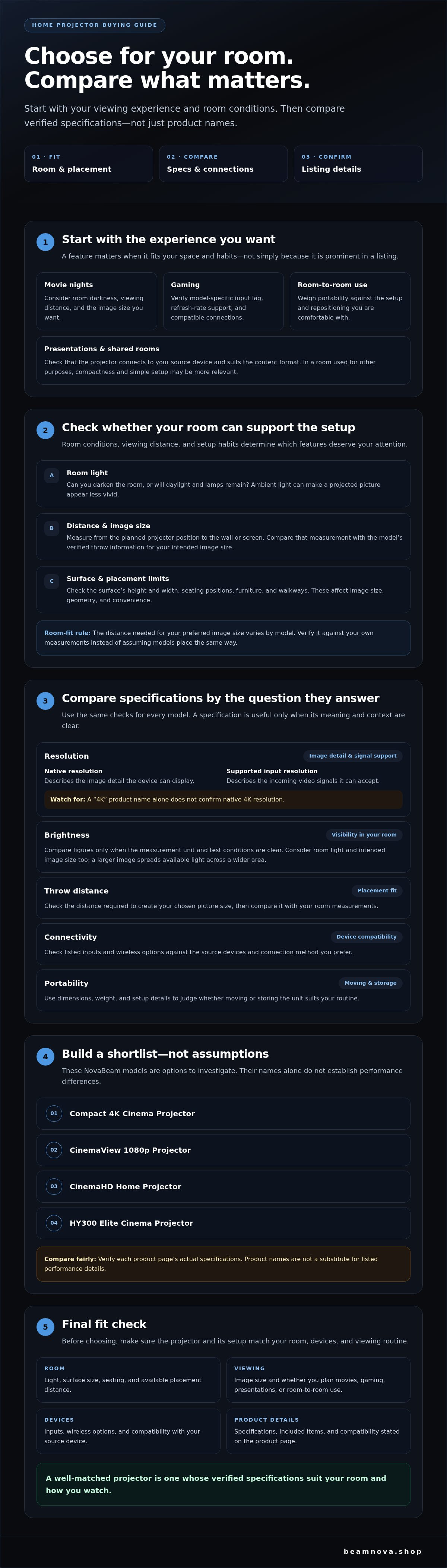
This guide helps you focus on the details that matter. You’ll learn how to assess room lighting, placement distance, and viewing habits, then use that information to compare key specifications and setup requirements. We’ll also show you how to use your needs to shortlist a NovaBeam option, including the Compact 4K Cinema Projector, CinemaView 1080p Projector, CinemaHD Home Projector, and HY300 Elite Cinema Projector. Product names alone don’t confirm performance, so you’ll also learn what to verify on each listing. By the end, you’ll have a practical way to compare options and choose a projector that suits your space.
Key Takeaways
- Start with how you’ll use the projector, then let your room and viewing habits shape your shortlist.
- Compare resolution, brightness, throw distance, connectivity, and portability, and verify what each product page actually states.
- Use NovaBeam’s four home projector options as a shortlist, not as a basis for assuming unlisted performance differences.
- Check room light, image size, source devices, and placement before choosing to avoid a setup that doesn’t fit your space.
- Confirm specifications, included items, and compatibility before checkout.
What to Consider Before Choosing a Projector
First, picture the experience you want: a cinematic movie night, gaming, a presentation in a shared room, or viewing that moves from one space to another. A projector casts an image onto a surface, turning a suitable wall or screen into a larger viewing area. For a foundational overview of how the technology works and where it’s used, see Video projector.
Before comparing model names, consider where and how you’ll use the projector. Room conditions, viewing distance, and setup habits determine which features deserve attention. Resolution matters, but it doesn’t determine perceived image quality on its own. Ambient light, image size, placement, and source content also affect what you see.
Start with the room, screen, and viewing conditions
Consider whether you can darken the room or whether daylight and lamps will remain during viewing. Then measure the distance from the planned projector position to the wall or screen. The distance needed to create your preferred image size varies by model, so compare your measurement with the model’s verified throw information. Check the surface’s height and width, where people will sit, and whether furniture or walkways limit placement. These details affect image size and geometry as well as convenience.
Match the projector to how you plan to watch
Occasional movie viewing may call for different priorities than frequent gaming, presentations, or moving a device between rooms. Think about how often you’ll set it up, whether it needs to pack away, and whether the room serves other purposes. A fixed viewing spot can make placement easier, while shared-room use may make compactness and simple setup more relevant. For gaming, check model-specific input lag, refresh-rate support, and connectivity rather than relying on broad labels. For presentations, confirm that the projector can connect to your source device and suit the content format.
- Movie nights: Consider room darkness, viewing distance, and the image size you want.
- Gaming: Verify gaming-related performance details and compatible connections for the exact model.
- Room-to-room use: Weigh portability against how much setup and repositioning you’re comfortable with.
Use these priorities to build a shortlist before comparing specifications. A feature matters because it fits your space and habits, not simply because it appears prominently in a listing.
Which Projector Specifications Matter Most?
Specifications are most useful when you connect them to your room and devices. Compare each model using the same questions, and verify details on its current product page before drawing conclusions. For a straightforward explanation of how a projector works, start with the basics, then use the specifications below to assess fit.
| Specification | What to check | Why it matters |
|---|---|---|
| Resolution | Native resolution and supported input resolution, listed separately | Native resolution describes the image detail the device can display. Supported input resolution describes the signal it can accept. |
| Brightness | Measurement unit and test conditions | Values reported or measured differently may not support a fair comparison. |
| Throw distance | Distance required for your intended image size | Confirms whether the planned placement works in your room. |
| Connectivity | Inputs and wireless options | Shows whether your source devices can connect in the way you prefer. |
| Portability | Dimensions, weight, and setup details | Helps you judge whether moving or storing the unit suits your routine. |
Resolution and brightness: read beyond the headline
Native resolution affects how much image detail is displayed, especially when you sit close to a large picture. Supported input resolution is different: it indicates which incoming video signals a model can accept, not necessarily the detail it can display natively. A “4K” product name alone doesn’t confirm native 4K resolution, so check the exact specification before comparing models.
Brightness contributes to visibility, but it isn’t the only factor. Ambient light affects perceived image quality: more light can make a projected picture appear less vivid, while a larger image spreads the available light across a wider area. Compare brightness figures only when units and test conditions are clear, and consider them alongside room conditions and your intended image size.
Throw distance, focus, and connections
Throw distance is the space between the projector and the image surface needed to create a chosen picture size. Compare the model’s throw information with your measurements. Also verify whether focus adjustment, keystone correction, or other placement features are included. Don’t assume these are consistent across models. Finally, list the devices you plan to connect, then confirm that the required inputs or wireless options are supported.
Use these criteria to compare verified details across the NovaBeam projector collection. A clear match between specifications, room dimensions, and source devices is more useful than choosing by a headline number alone.
How NovaBeam’s Projectors Compare for Different Needs
NovaBeam’s collection includes several home projector options. Treat each product name as a starting point, not a complete specification sheet. Terms such as “4K,” “1080p,” and “HD” in a name don’t by themselves confirm a model’s native resolution or performance. Verify the current product details before deciding which option fits your room and devices. For additional context on comparing models for different uses, see PCMag’s guide to the best home projectors.
Compact 4K Cinema Projector and CinemaView 1080p Projector
The Compact 4K Cinema Projector and CinemaView 1080p Projector are two options to compare. Their names can help you identify listings to review, but they aren’t enough to rank the models or predict how they’ll look in your space.
Before comparing them, check each current product page for native and supported input resolution, brightness measurement and test conditions, connectivity, and included features. Confirm the throw distance too, so you know whether the model can create your intended image size from the placement available in your room.
CinemaHD Home Projector and HY300 Elite Cinema Projector
The CinemaHD Home Projector and HY300 Elite Cinema Projector are two more options in the collection. Consider your routine when deciding whether to review either listing, such as whether you plan to use a projector for more than one activity or move it between rooms.
Check the exact specifications before deciding whether either model suits your needs. For gaming, confirm the relevant performance details and connections. For presentations, make sure your source device is compatible. For flexible use, verify the model’s dimensions, setup requirements, and placement capabilities.
A practical comparison starts with your needs, then checks the evidence. Review resolution, brightness, throw information, focus and keystone features, connectivity, and included items on the current listings. This keeps your shortlist grounded in confirmed details rather than assumptions based on product names. To compare the projector collection, review the available model information alongside your room measurements and intended use.
How to Check Projector Fit and Avoid Common Buying Mistakes
A careful fit check can prevent a promising model from being awkward to place or connect. Before ordering, work through these five points using your room measurements and the details on the product page:
- Room light: Note whether you can darken the space or will watch with daylight or lamps present.
- Throw distance: Measure from the intended projector position to the image surface, then compare it with the model’s verified throw information.
- Image size: Decide how wide you want the picture to be and check whether that size suits your room and seating.
- Source: Identify the devices you’ll connect, such as a computer, game system, or other video source, and confirm compatible inputs or wireless options.
- Placement: Check whether your planned table, shelf, or other surface provides a suitable position and enough room for the device.
Image size and brightness work together. Under the same conditions, a larger projected image may look less bright because the available light is spread across a wider area. Consider room lighting and your preferred image size together rather than treating a brightness figure as a guarantee of how the picture will look.
Measure the space and plan projector placement
Measure both the projector-to-screen distance and the maximum image width your space can accommodate. Check where furniture, walkways, and seating fall in relation to the beam. Then compare your measurements with the shortlisted model’s verified throw and adjustment specifications, including focus or keystone features if listed. Don’t assume digital adjustments can compensate for every placement limitation.
Check compatibility with your viewing setup
Make a list of the devices and content sources you expect to use. Match each one against the product’s listed connections, wireless capabilities, and operating-system details, if provided. Projector hardware doesn’t necessarily include streaming apps or subscriptions, so check what’s included and what your setup requires instead of assuming access is built in.
Finally, don’t choose by a resolution label or price alone. Confirm the complete specification set, intended placement, compatible sources, and included items on the current product page before checkout. Compare NovaBeam’s projector options against your measurements and viewing checklist to narrow your shortlist.
Choose Your Projector and Take the Next Step
You’ve considered your viewing habits, room layout, and the specifications that need careful checking. Now bring those pieces together: define your main use, measure the space, compare verified model details, and shortlist the options that fit. This keeps the decision focused on what will work in your home, rather than on a product label alone.
Use your priorities to make the final shortlist
Use NovaBeam’s product names to decide which listings are worth a closer look, then let confirmed specifications guide your final choice. The Compact 4K Cinema Projector may belong on your shortlist if its verified resolution, brightness, throw information, and connections suit your viewing space and devices. Don’t treat “4K” in the name as proof of native 4K resolution.
Consider the CinemaView 1080p Projector or CinemaHD Home Projector based on their current product-page details and how they match your intended use. If moving your setup between rooms is a priority, include the HY300 Elite Cinema Projector for consideration, while checking its verified dimensions, placement needs, and capabilities. These are starting points, not performance rankings. The right fit depends on confirmed details and your requirements.
If you’d like more context before comparing the first option, NovaBeam’s guide to how compact 4K cinema projectors work can help you explore the topic further.
Confirm the details before you buy
Product pages and collection contents can change, so review the current listing before checkout. Confirm the exact specifications, included items, and any listed variants for the model you’re considering. If a power or regional variant is offered, check that the selected option matches your requirements rather than assuming all versions are identical.
Make one final pass through your room measurements and source-device list. Confirm that the projector can be placed where planned, create an image size that suits the available space, and connect to the devices you intend to use. A short compatibility check can help you avoid a mismatch later.
With your priorities clear and the details verified, you’re ready to explore the current options. Browse NovaBeam projectors and compare the available product information to choose a projector that fits your room and viewing plans.
Make Your Next Viewing Setup a Thoughtful Fit
The strongest choice starts with your room and how you’ll watch, not a headline specification. Measure the available placement distance and image area, consider ambient light, and check how resolution, brightness, connections, and other verified features match your needs. These steps make it easier to shortlist a projector without relying on assumptions.
NovaBeam’s collection includes four models identified in this guide: the Compact 4K Cinema Projector, CinemaView 1080p Projector, CinemaHD Home Projector, and HY300 Elite Cinema Projector. Compare the current product details to see which options meet your requirements. Confirm each model’s specifications, included items, and compatibility on its product page before deciding. Names alone don’t establish performance or suitability.
Ready to compare the available options against your room and viewing plans? Explore NovaBeam projectors and take the next step toward a viewing setup that feels right for your home.
Frequently Asked Questions
Is a projector better than a TV?
Neither is universally better; the right choice depends on your preferred viewing experience and room. A projector can create a large shared image, which may suit movie nights or group viewing. A TV may be more practical if the room is bright and you can’t control ambient light. Compare image expectations, placement options, viewing habits, and setup preferences before deciding which fits your home.
What resolution should I look for in a projector?
Choose resolution based on your viewing distance, image size, source material, and desired level of detail. Check whether the product page lists native resolution, which describes the image detail the device displays, or supported input resolution, which describes the signals it can accept. They aren’t interchangeable. Verify the exact specifications for each model, and don’t assume a resolution label alone describes the complete viewing experience.
How bright should a projector be for a living room?
There’s no single brightness figure that suits every living room. The result depends on ambient light, projected image size, screen surface, and whether you can darken the space. Compare brightness claims only when the units and measurement conditions are clear, then check the model-specific product details. Consider when you’ll watch and how much light enters the room rather than choosing by a number in isolation.
Can I use a projector in a bright room?
Yes, but daylight and room lighting can make the image look less vivid. Closing curtains, reducing nearby lights, or choosing a smaller image may help you adapt the viewing setup. Before selecting a model, review its verified brightness information and think about the conditions in which you’ll use it. A specification can inform your choice, but it can’t guarantee the same perceived result in every room.
How far should a projector be from the screen?
The distance depends on the model’s throw characteristics and the image size you want. Measure from the planned projector position to the wall or screen, then compare that space with the model’s verified specifications. Check that the resulting image size suits your room and seating arrangement. Don’t assume compact models share the same placement requirements or can create identical image sizes from the same distance.
Are all projectors suitable for gaming?
No. To assess gaming suitability, check model-specific information about input lag, refresh rate, supported resolutions, and available connections. These details can affect responsiveness and compatibility with your console or computer. A general home-entertainment description doesn’t confirm gaming performance. Match the listed specifications to your device and the types of games you play before choosing a model.
What should I check before buying a projector online?
Review the current product page for native and supported input resolution, brightness details, throw information, connections, included items, and compatibility with your source devices. Measure the intended placement and image area in your room. Check any listed variants and confirm the selected option fits your requirements. If an important feature or specification isn’t clearly stated, seek confirmation rather than assuming it’s included.