
4K Projector for Home Theater: How to Choose in 2026
The best 4k projector for home theater depends on more than its resolution label. “4K” can describe native resolution or pixel-shifting, and neither tells you on its own how bright or immersive the picture will look in your room.
Comparing projector specifications can get confusing quickly. The right choice depends on the distance from the projector to the screen, your target image size, the light in the room, and what you plan to watch or play.
This guide explains which specifications affect the picture, how to match a projector to your room and viewing habits, and what to confirm before buying. You’ll also learn how to check throw distance, screen placement, and connectivity, including gaming needs such as 4K/120Hz support. Use the checklist to compare options, including NovaBeam’s Compact 4K Cinema Projector, and verify its current product details against your setup.
Key Takeaways
- A “4K” label can refer to different resolution methods, so check what the specification actually describes.
- Compare brightness, contrast, throw ratio, and inputs together rather than judging a projector by one headline number.
- Decide whether a 4k projector for home theater suits your content and viewing setup before choosing it over a 1080p model.
- Use your planned screen size and projector position to check the manufacturer’s placement guidance before buying.
- Consider NovaBeam’s Compact 4K Cinema Projector as one option, and verify its specifications against your requirements.
What to know before choosing a 4K projector for home theater
A 4K home theater projector displays a high-resolution image on a screen or suitable wall, but resolution alone won’t tell you whether it fits your space. Compare the resolution method with brightness, contrast, image size, throw distance, and available inputs. Together, these specifications help you judge picture detail, viewing impact, and setup fit.
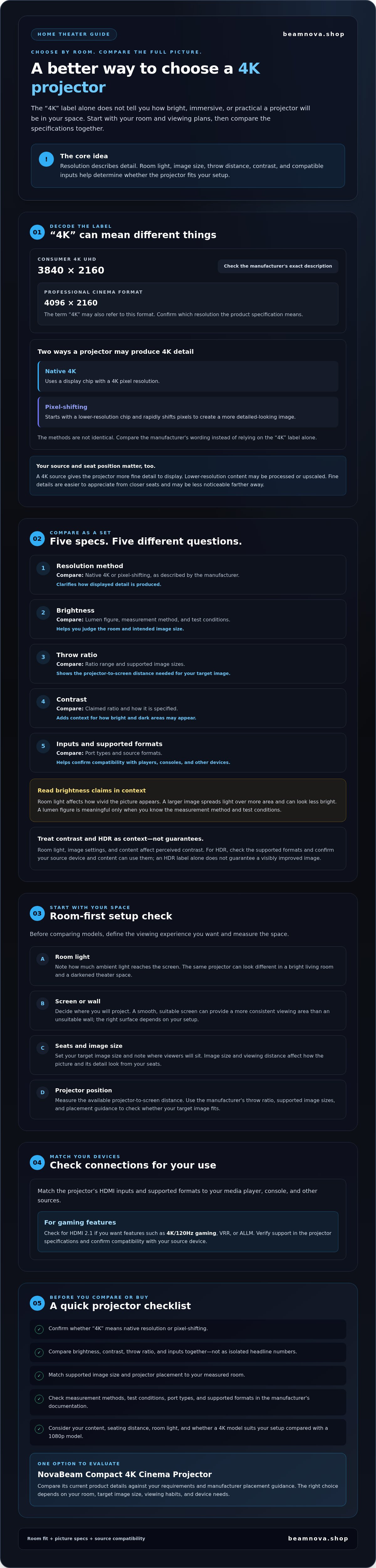
4K UHD is a consumer display format with a resolution of 3840 × 2160 pixels. The term “4K” can also refer to the 4096 × 2160 format used in professional cinema, so check how the manufacturer describes its projector. This overview of 4K resolution explains the distinction.
What does 4K mean on a home theater projector?
Native 4K uses a display chip with a 4K pixel resolution. Pixel-shifting starts with a lower-resolution chip and rapidly shifts pixels to produce a more detailed-looking image. These methods aren’t identical, so check the resolution method in each model’s specifications instead of relying on the “4K” label alone.
The source content matters, too. A 4K source gives the projector more fine detail to display, while lower-resolution content may be processed or upscaled. Viewing distance also affects how much detail you notice. Fine details are easier to appreciate from closer seats, while they may be less noticeable farther back. Consider your usual content and seating position when comparing a 4k projector for home theater.
Which room conditions shape the viewing experience?
Start with the room, not the spec sheet. Note how much ambient light reaches the screen, whether you’ll project onto a wall or a screen, where viewers will sit, and how large an image you want. These details help you judge brightness needs and whether the projector can produce your target image size from the available distance.
The same projector can look different in a bright living room and a darkened theater space. Room light can make the picture appear less vivid, while the projection surface and image size affect how it looks from your seats. A smooth, suitable screen surface can provide a more consistent viewing area than an unsuitable wall, but the right choice depends on your setup.
Choosing a 4k projector for home theater works best as a room-first process: define the viewing experience you want, measure the space, then compare the specifications that support it. The next sections explain how to evaluate performance and verify that a model will fit before buying.
Compare 4K projector specifications that affect home theater performance
A spec sheet is most useful when you read its numbers as a group. Brightness, throw ratio, contrast, resolution method, and inputs each answer a different question about whether a projector can deliver the picture and fit your setup requires.
| Specification | What to compare | Why it matters |
|---|---|---|
| Resolution method | Native 4K or pixel-shifting, as described by the manufacturer | Clarifies how the projector produces its displayed detail. |
| Brightness | Lumen figure, measurement method, and test conditions | Helps you judge suitability for your room and intended image size. |
| Throw ratio | Ratio range and supported image sizes | Shows how far the projector must sit from the screen to create your target image. |
| Contrast | Claimed ratio and how the manufacturer specifies it | Provides context for how distinct bright and dark parts of the image may appear. |
| Inputs | Port types and supported source formats | Helps confirm compatibility with your media player, console, or other devices. |
How should you compare brightness, contrast, and HDR?
Brightness affects how clearly an image holds up against room light, but screen size matters, too. Spreading light over a larger image can make it appear less bright. There’s no single lumen figure that guarantees the right result in every room. A lumen rating is meaningful only when you know how it was measured and the conditions behind the claim. Check the measurement method and test context in the manufacturer’s documentation before comparing models.
Contrast describes the difference between dark and bright areas, but it isn’t a complete picture-quality score. Room light, image settings, and content also affect what you see. Treat HDR labels similarly: verify which formats are supported, then check that your source device and content can use them. A listed HDR format alone doesn’t guarantee a visibly improved image.
Which resolution, connection, and placement details matter?
Compare resolution claims using each manufacturer’s exact terminology. Then match the projector’s HDMI inputs and supported formats to your devices. In 2026, HDMI 2.1 is worth checking if you want features such as 4K/120Hz gaming, VRR, or ALLM. Confirm that the specific input supports the formats you intend to use.
Throw ratio links projector distance to image width. A model with a longer throw may need more room to create the same image size as a short-throw model. Use the manufacturer’s throw range and lens placement guidance to check your available space before shortlisting. You can browse NovaBeam’s home projectors and compare each model’s published specifications with your requirements.
Is a 4K projector worth it for your home theater?
A 4K label alone doesn’t guarantee a better fit for every room. The value depends on what you watch, how large an image you want, how far you sit from it, and whether the projector can be placed correctly. A 4k projector for home theater makes the most sense when its resolution and other specifications support the experience you want.
When can a 4K projector make sense?
Consider 4K if you regularly watch compatible high-resolution content, want a large projected image, and sit close enough to appreciate fine detail. These factors make resolution relevant to your priorities, but they don’t promise a particular result. The projector’s resolution method, image processing, focus, room conditions, and source quality also influence what reaches the screen.
Check that your playback device and content can supply a compatible 4K signal. If most of your viewing is lower-resolution video, the projector’s processing may affect how that content appears, but it can’t add original detail that wasn’t in the source. Compare the models’ supported formats and stated resolution methods before deciding.
When might another projector fit better?
A 1080p projector may be worth considering if it better suits your typical content, desired image size, viewing distance, or placement constraints. Compare 1080p and 4K models under the same conditions: the same screen size, seating position, source content, room lighting, and available projector location. This keeps the decision focused on your setup rather than a resolution label alone.
If your room limits where a projector can sit, placement flexibility and throw specifications may matter more than resolution. If you mostly watch 1080p content and sit far enough away that added detail is less relevant, weigh those factors against the features and compatibility you need. NovaBeam’s catalog includes both the Compact 4K Cinema Projector and the CinemaView 1080p Projector. Compare their verified specifications with your requirements. For more context on the category, read the compact 4K cinema projector guide.
In short, weigh resolution against your content, room, seating, and placement together. A considered match can matter more than choosing the higher resolution by default.
Match a 4K home theater projector to your room and setup
Room measurements turn a shortlist into a practical choice. Before selecting a 4k projector for home theater, work through this sequence to make sure your image goals, placement, and product specifications line up.
- Measure placement. Measure the clear distance from the planned projector position to the screen, and note any obstacles or mounting limits.
- Set image goals. Decide where viewers will sit and how wide an image you want from that position.
- Assess light. Consider daylight, room lighting, and whether you can control them during viewing.
- Verify specifications. Check the projector’s throw ratio, supported image size, inputs, and manufacturer placement guidance against your measurements.
How do throw distance and screen size affect projector placement?
Throw ratio relates the distance from the projector lens to the screen to the image width. A larger image generally requires more throw distance, but the exact fit depends on the model’s verified ratio and lens range. Check the manufacturer’s guidance for your target image size and planned position. Confirm whether mounting options, focus range, lens shift, or keystone correction suit your setup. Don’t assume a feature is included. Digital correction can affect image quality, so verify how the specific model handles it.
Use room conditions as a guide, then confirm the fit against the specifications:
| Room scenario | What to prioritize |
|---|---|
| Darkened room | Compare image size, contrast information, and placement fit for your planned viewing. |
| Mixed light | Assess how much light reaches the screen during viewing and compare brightness claims using their stated measurement method. |
| Space-constrained setup | Check throw ratio, lens placement guidance, and whether the required screen size is achievable from the available distance. |
What should you check about light, sound, and connections?
Think about the room at the time you’ll actually watch. Can you dim lights or block daylight, or will the projector need to work with light in the space? Then list your source devices, such as a console or media player, and confirm the projector has compatible HDMI inputs and supports their required formats.
Audio needs a separate check. Review the manufacturer’s details for built-in audio and confirm how external audio equipment can connect if you plan to use it. These practical checks can prevent a promising picture specification from becoming a setup mismatch.
Once you’ve mapped your room and feature priorities, explore NovaBeam’s projector range and compare the published details with your measurements.
Choose your 4K projector and verify the details before buying
Your shortlist should reflect your room and viewing habits, not just a prominent resolution label. Before choosing a 4k projector for home theater, rank your must-haves: a workable projector position, your desired image size, compatibility with your source devices, and the picture characteristics that matter most in your viewing environment.
How can you shortlist a projector without overvaluing one specification?
Compare each candidate against the same criteria. Record manufacturer-confirmed information separately from your preferences, and mark missing details as “not confirmed” rather than assuming a feature is included. This makes information gaps visible and keeps a single headline specification from dominating your decision.
| Check | What to record |
|---|---|
| Room fit | Available placement distance and intended image size |
| Resolution method | Manufacturer’s description of native resolution or pixel-shifting |
| Brightness | Published figure, measurement method, and stated context |
| Throw ratio | Verified ratio and supported image-size guidance |
| Connectivity | Inputs and supported formats for your source devices |
Use the same checklist for every model, including NovaBeam’s Compact 4K Cinema Projector. Treat it as an option to evaluate against your requirements, not an automatic recommendation. Verify model-specific claims on the current product page before comparing it with alternatives. If a key specification isn’t listed, treat it as unknown until you can confirm it.
What should you confirm on a product page before ordering?
Check the resolution method, brightness measurement, throw ratio, inputs, and supported formats. Also review the product page for included components, audio details, and any other feature you need. Match the connection requirements to your actual devices, then confirm the placement guidance works for your room. These checks can reveal compatibility gaps before you decide.
Product information and store details can change, so review the current page for availability, shipping information, and applicable checkout details before ordering. Keep confirmed specifications distinct from personal priorities: a format you need is a requirement, while a preferred picture style is a matter of taste.
Ready to compare projector options against your room and feature checklist? Explore NovaBeam projectors and review the current product details before choosing.
Make your next projector choice with confidence
The right 4k projector for home theater is the one that fits your room and viewing priorities, not simply the one with the most persuasive resolution label. Before deciding, confirm the resolution method, brightness measurement, throw ratio, and connections against your screen, placement, lighting, and devices. If a detail isn’t clearly stated, treat it as unconfirmed and check the current product information before comparing models.
NovaBeam offers the Compact 4K Cinema Projector alongside the CinemaView 1080p Projector and other home projector options. Consider them as candidates, then weigh their verified specifications against your checklist rather than assuming any model is the best fit for every setup.
To take the next step, browse NovaBeam’s projectors and compare the current product details with your room measurements and priorities. With those checks in hand, you can narrow your shortlist based on how you actually watch.
Frequently Asked Questions
Is a 4K projector worth it for a home theater?
A 4K projector can be worth it when your room, viewing distance, screen size, and content make the added resolution useful. A 4k projector for home theater isn’t automatically the right choice just because it carries a 4K label. Check the projector’s resolution method, brightness information, placement requirements, and connections, then consider what you watch most. Detailed content on a suitably sized image may make resolution a higher priority for you.
Do you need a special screen for a 4K projector?
No, a screen marketed for 4K isn’t automatically required, but the projection surface can affect the image you see. Consider the screen’s material, texture, and condition, along with room light, image size, and seating distance. For example, an uneven or marked surface may distract from the picture. Check the projector’s setup guidance and assess the full surface rather than assuming a “4K” screen label guarantees a sharper result.
How bright should a 4K home theater projector be?
There’s no single brightness figure that suits every home theater. The right level depends on ambient light, projected image size, screen characteristics, and whether you can darken the room. Compare brightness figures only after checking how the manufacturer measured them and what context applies. Then weigh brightness alongside contrast and placement. If you watch with lights on, assess the room under those conditions rather than relying on a number alone.
Can a 4K projector work in a small room?
Yes, a 4K projector can work in a small room if its placement range supports your intended image size from the available distance. Measure from the planned projector position to the screen, including any mounting limits, then compare that distance with the manufacturer’s throw ratio and placement guidance. Check any focus or lens adjustments in the specifications. A compact projector body doesn’t necessarily mean the model can create a large image from nearby.
What is the difference between native 4K and pixel-shifted 4K?
Native 4K describes a projector whose imaging system provides the stated 4K resolution, while pixel-shifting uses image processing and rapid pixel positioning to present a higher-resolution-looking image from a lower-resolution chip. Implementations and terminology can vary by manufacturer. Read the official specifications for each model and compare the stated resolution method rather than relying on a product title. Don’t assume every projector marketed as 4K produces its image in the same way.
Does a 4K projector need a dark room?
No, a dark room isn’t essential, but reducing ambient light can make contrast and detail easier to see. Your results depend on the projector, screen, image size, and light reaching the projection surface. If you’ll watch with lights on, review the manufacturer’s brightness information and consider your room conditions together. Curtains, viewing times, and screen placement may also help you plan. Verify claims for the specific model instead of assuming one setup suits every projector.
What should I check before buying a 4K projector for home theater?
Start by measuring the room, planned projector position, intended image size, and viewing distance. Then verify the model’s resolution method, brightness measurement, throw ratio, inputs, supported formats, and audio details. Check that its connections match your source devices, such as a console or media player, and review guidance for your screen. Compare candidate models using the same criteria, and confirm current product-page information before relying on any specification or feature claim.