
Projectors for Home Theater and Portable Viewing
A phone can connect to a projector when both devices support a compatible wired or wireless connection. But choosing the right projector involves more than getting an image onto a wall: brightness, resolution, contrast, and color all shape the viewing experience.
It’s easy to focus on connecting devices, but the room and your viewing habits matter just as much. A bright living space calls for different priorities than a dim room set aside for films, while portable viewing makes flexibility essential.
This guide explains how light sources affect everyday use, what brightness can and can’t do, and how resolution, contrast, and color influence image quality. You’ll learn how to compare options for a home cinema or a flexible viewing setup, so you can choose a projector that suits the way you watch.
Key Takeaways
- Match the light source and brightness to your room and viewing habits for an image that feels clear and comfortable.
- Choose portability when flexible placement matters, and prioritize a dedicated setup when a more immersive home theater experience is the goal.
- Assess resolution, contrast, and color gamut together to understand how detailed, dimensional, and vivid your picture can look.
- Use your space and preferred viewing style to narrow the options, then explore a model that fits your priorities.
Light source, brightness, resolution, contrast, and color gamut
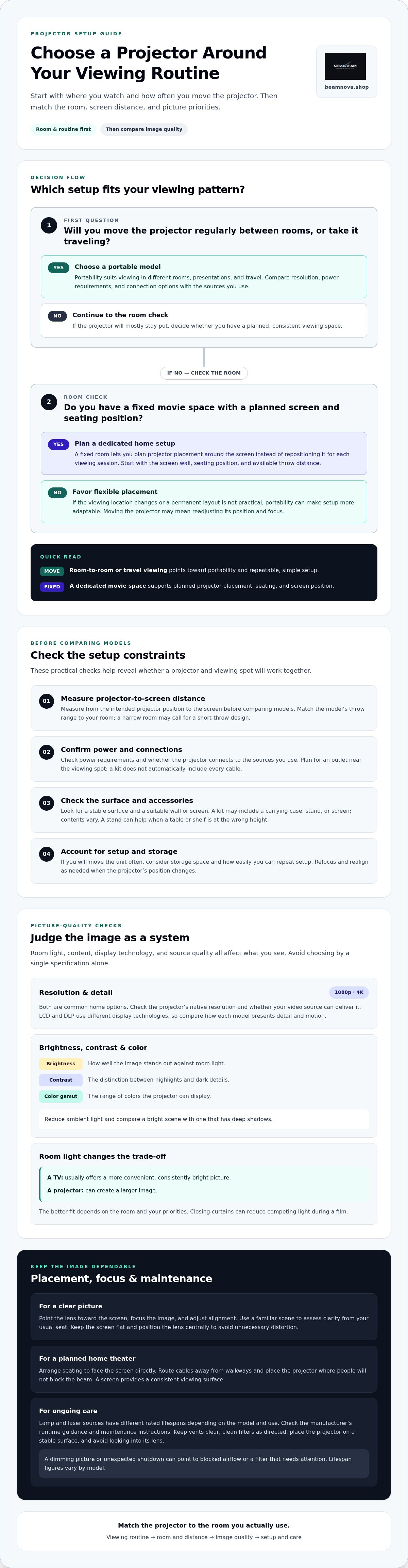
Picture quality depends on the room, the content, and the display working together. Compare these factors as a system instead of choosing by one specification alone.
Resolution and Display Technology
Resolution describes image detail, with 1080p and 4K among common home options. Check native resolution and ensure your video source can deliver it. LCD and DLP use different display technologies, so compare how each model presents detail and motion. For setup, point the lens toward the screen, focus the image, and adjust alignment. Use a familiar scene to assess clarity from your usual seat.
Brightness, Contrast, and Color Gamut
Brightness determines how well an image stands out against room light. Contrast shapes the distinction between highlights and dark details, while color gamut describes the range of colors displayed. A TV usually delivers a more convenient, consistently bright picture; a projector can create a larger image. The better fit depends on your room and priorities. Reduce ambient light, then compare a bright scene with one that has deep shadows.
Light Sources and Maintenance
Lamp and laser sources have different rated lifespans, depending on the model and how it is used. Compare the manufacturer’s runtime guidance and maintenance instructions. Keep vents clear and clean filters as directed. A dimming picture or unexpected shutdown can point to blocked airflow or a filter that needs attention. Place the projector on a stable surface and avoid looking into its lens. Lifespan figures vary by model, so check the rating for the specific unit.
Should I buy a portable or a home projector?
Choose a portable model if you watch in different locations, or a home setup if you want a consistent screen and seating position. Consider how often you’ll move it, where power is available, and how much distance you have between the unit and screen.
Portable and Ultra-Portable Projectors
Portable models suit movie nights in different rooms, presentations, and travel. Compact designs are easier to carry, but small size alone doesn’t determine brightness or image detail. Compare each projector’s resolution, power requirements, and connection options with the sources you use. Also consider whether your destination has a stable surface and a suitable wall or screen.
Before buying, measure the distance from the intended projector position to the screen. This helps you judge whether the image can reach a useful size in a bedroom, shared living area, or temporary viewing spot. If you’ll move the unit often, consider how it fits your storage space and whether setup is simple enough to repeat.
A home model may suit a room where the equipment can stay in place. A portable projector offers more flexibility, but moving it often can mean readjusting its position and focus. Let your routine guide the choice: regular room-to-room viewing favors portability, while a permanent movie space works well with a planned setup that doesn’t require installation.
Portable Projector Kits
A kit may include useful accessories such as a carrying case, stand, or screen. Contents vary, so compare them with what you already own. A case makes transport easier, while a stand helps position the image if a table or shelf is at the wrong height.
Check that the screen fits your available space and that the stand provides stable support. Plan for power and source connections, too. A kit doesn’t automatically include every cable, and you’ll still need an outlet near your viewing spot.
Compare projector options for different spaces with your expected viewing location and setup needs.
Home theater projectors
A dedicated theater setup turns a living room or media room into a shared viewing space. Start with the screen wall, seating position, and available throw distance, then choose equipment that fits. A fixed room lets you plan placement around the screen rather than moving the projector for every viewing session.
Measure the distance from the intended projector position to the screen before comparing models. This helps determine whether the image can reach your preferred size from a shelf, table, or ceiling position. For example, a narrow room may call for a short-throw design, while a deeper room offers more placement options. Compare the model’s throw range with your room dimensions.
Choose resolution around your viewing content and screen size. A 1080p image can suit regular films and shows, while 4K presents more detail when the source supports it. Look beyond the resolution label: lens focus, alignment, and source quality also influence the image. Keep the screen flat and position the lens centrally to avoid unnecessary distortion.
Control the room to improve the picture. Closing curtains reduces competing light during a film, while a screen provides a consistent viewing surface. Arrange seating so viewers face the screen directly, and route cables away from walkways. For shared movie nights, place the projector where people won’t block the beam as they move through the room.
Home, school, and business use call for different priorities. A home theater focuses on films, streaming content, and comfortable viewing from fixed seats. A classroom may need clear slides visible from different desks, while a meeting room benefits from straightforward laptop connections. In each setting, match placement, image size, and source connections to the main task.
Before settling on a home setup, sketch the room and mark the screen, seating, power outlet, and projector position. This simple plan reveals cable and distance constraints early. A well-matched system makes everyday viewing feel intentional, whether the room is used for film nights, presentations, or family entertainment.
Premium residential projection
A premium home cinema setup starts with a room designed around the viewing experience. Choose the screen wall first, then plan seating, equipment placement, and light control. For example, a media room with blackout curtains calls for a different setup than a bright family room used for movies and everyday television.
Consider how the room serves you beyond film nights. A living room may need discreet projector placement that preserves its everyday use, while a dedicated theater can prioritize a fixed screen and carefully arranged seating. Decide whether the screen should stay visible or blend into the room when not in use. That choice affects furniture layout, cable routing, and equipment placement.
For a considered buying decision, list the content you watch and the sources you use. Films, sports, and console games can place different demands on motion, detail, and connections. Check that your sources connect smoothly, then match resolution to your planned image size and viewing distance. With a larger image, placement and focus become especially important.
Set up the room in a practical sequence: position the screen, place the projector at the intended distance, align the image, and focus it. Then manage ambient light with curtains or shades and test a familiar scene. Look for readable shadow detail, natural skin tones, and comfortable brightness. Check the image from the main seats, not just beside the screen.
A premium result comes from balance, not a single headline specification. A carefully planned room, compatible sources, and a display suited to your viewing routine work together to create a more immersive home experience. Explore projectors for home viewing and compare the options with your room plan.
NovaBeam: Compact 4K Cinema Projector
NovaBeam’s Compact 4K Cinema Projector is a natural option for a home setup where 4K resolution is a priority. Choose it after considering your room, screen placement, and the content you plan to watch. For a 1080p preference, compare the CinemaView 1080p Projector; the HY300 Elite Cinema Projector offers another named option in the range.
These choices help you start with your viewing priorities instead of a single headline feature. Consider whether you want a dedicated movie setup, flexible viewing, or a distinctive design such as the Cosmic Astronaut Projector. Then compare product names and resolution categories with the needs you identified in this guide.
Explore the options at beamnova.shop or contact NovaBeam.
Make Your Viewing Space Your Own
The right projector can shape more than movie night. It can give a familiar room a new purpose, make shared viewing part of everyday life, or bring polish to a flexible setup. Let the way you watch guide your next step, whether you’re planning a dedicated cinema space or a screen for different occasions.
NovaBeam offers the Compact 4K Cinema Projector, CinemaView 1080p Projector, and HY300 Elite Cinema Projector. Compare these options with the viewing priorities you’ve set, and choose the model that fits your plans.
Explore NovaBeam’s projector range and take the next step toward a more immersive home viewing experience.
Frequently Asked Questions
Can I connect my phone to a projector?
Yes, if your phone and display share a compatible connection method. For a wired setup, use an adapter that matches your phone’s port and the display’s input. For wireless viewing, both devices need compatible wireless capabilities. Before movie night, play a familiar video and confirm that the picture and sound work as expected, since some apps handle external displays differently.
What is the best overall projector?
There isn’t one best choice for every room and viewer. Start with your main use, then compare native resolution, available connections, and placement needs. For a 4K-focused home setup, NovaBeam’s Compact 4K Cinema Projector is one option. If you mainly watch 1080p content, compare models in that resolution category instead of paying attention to a single headline feature.
What is the best projector for outdoor movies?
Choose a model designed for outdoor use, then plan the viewing area around darkness, stable placement, and power access. NovaBeam describes its Compact 4K Cinema Projector for indoor or outdoor use. Set it on a secure surface, keep cables clear of foot traffic, and test your source and audio before guests arrive. Outdoor viewing works best after daylight fades.
What kind of projector should I get?
Choose based on where you’ll watch and how often the setup needs to move. A fixed media room can suit a home-cinema model, while shared use across rooms favors portability. For example, compare a 4K model for supported high-resolution content with a 1080p option for compatible sources. Also consider whether you need specific inputs for a laptop, console, or phone.
Which projector has the best picture quality?
The strongest picture comes from matching the display to both the source and room. A true 4K model can show detailed 4K content, while a 1080p source won’t gain its original detail simply by appearing on a higher-resolution display. Compare image clarity from your usual seating position, and assess focus across the screen rather than judging only its center.
What is a projector and how does it work?
A projector turns video or image signals into light, then directs that light through an optical system onto a screen or wall. The lens spreads the image across the viewing surface, making it appear larger. For example, connect a laptop, select its display output, and focus the projected desktop. The source provides the picture; the projector creates its visible image.