
Projector with Bluetooth Audio for Home Cinema Setups
A projector with Bluetooth audio can send sound wirelessly to compatible headphones or speakers, helping create a cleaner home cinema setup. Built-in speakers keep everyday viewing simple, while an external audio device can make the sound feel more suited to a dedicated movie night.
Choosing a projector with Bluetooth audio means looking beyond the Bluetooth label. Consider how you plan to listen, how the projector fits your room, and whether you need to add a screen or accessories. A portable model may suit flexible viewing, while a fixed setup can prioritize a larger, immersive picture.
This guide explains how to compare Bluetooth audio with built-in sound, what to check in a product’s listed accessories, and how portable projectors can fit different spaces and routines. You’ll get a clearer sense of which features matter for your home cinema and how to choose a setup that works from the first scene to the last.
Key Takeaways
- Compare wireless audio compatibility alongside picture features to find a projector that fits your viewing habits.
- Choose between built-in sound and an external Bluetooth speaker based on the listening experience you want.
- Review what screens and accessories are included so you can plan the complete setup, not just the projector.
- Match portability to where you’ll watch, then explore projector options suited to your space and priorities.
Bluetooth projector product selection
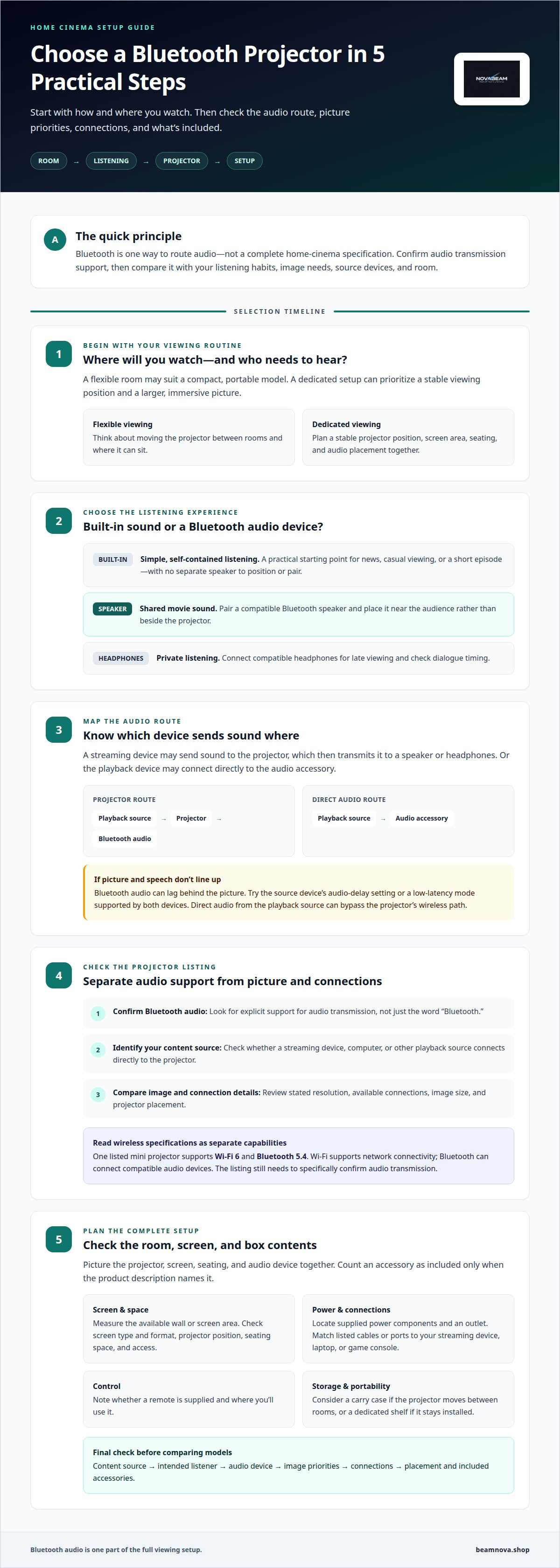
Start with the room and your viewing routine, then compare projector features. A projector with Bluetooth audio can send sound to compatible wireless headphones or speakers, reducing cable clutter around the seating area. For shared movie nights, a speaker may suit group listening; for late viewing, headphones keep sound personal. The right choice depends on how you watch, not the Bluetooth label alone.
Next, separate image priorities from connection features. Consider where the projector will sit, how large an image you want, and which devices will provide your content. Then review the stated resolution and available connections. These details shape everyday use, while Bluetooth describes one way to route audio. A compact model may suit a flexible room; a dedicated setup can prioritize a stable viewing position.
- Confirm the connection: Look for Bluetooth audio support in the specifications, not just Bluetooth mentioned without context.
- Match the listener: Choose headphones for private viewing or a speaker for shared sound.
- Check the source: Identify whether your streaming device, computer, or other playback source connects directly to the projector.
- Plan placement: Picture the projector, screen, seating, and audio device together before choosing a model.
Wireless standards can help distinguish listings, but they don't replace checking the intended use. One listed mini projector supports Wi-Fi 6 and Bluetooth 5.4. Treat those as separate capabilities: Wi-Fi supports network connectivity, while Bluetooth can connect compatible audio devices. Confirm that the product description specifically supports audio transmission before comparing models.
Finally, plan your setup in sequence: identify your content source, decide who needs to hear the sound, and choose a listening device. Then compare the projector’s image features, connections, and placement needs. This checklist helps narrow your options without mistaking a wireless feature for a complete home cinema solution.
Built-in speakers and Bluetooth audio
Yes, Bluetooth audio can lag behind a projector’s picture, creating a lip-sync mismatch. Try the source device’s audio-delay setting or a low-latency mode supported by both devices. Connecting audio directly to the playback source can also bypass the projector’s wireless path.
Built-in speakers offer a simple starting point for news, casual viewing, or a short episode. They keep the setup self-contained, with no separate speaker to position or pair. For a film night, an external Bluetooth speaker can place sound closer to the seating area. Compare both options in the room where you’ll watch, since placement and ambient noise affect how clearly dialogue carries.
Before pairing, identify the audio route. A streaming device may send sound to the projector, which then transmits it to a speaker or headphones. Alternatively, the playback device may connect directly to the audio accessory. The second route can help if the projector’s Bluetooth connection introduces noticeable delay. Keep the video and audio paths simple, and avoid routing sound through multiple wireless devices.
- For everyday viewing: Use the built-in speaker when convenience matters more than room-filling sound.
- For shared movies: Pair a Bluetooth speaker and place it near the audience, rather than beside the projector.
- For private listening: Connect compatible headphones and test dialogue timing before settling in.
- For lip-sync problems: Adjust audio delay on the playback device, or try a supported low-latency mode.
Test with a familiar scene that includes clear speech, such as a dialogue-heavy film. Notice whether voices align with faces, then adjust one setting at a time. If the timing remains distracting, switch from Bluetooth to a wired connection if your equipment supports one. This gives you a practical comparison without changing the picture setup.
For a broader look at home viewing choices, explore projector options for home cinema as you plan the audio setup.
Included screens and accessories
A projector package may include the unit alone or list a screen and supporting accessories. Compare the box contents with what your room needs. A pull-down screen may suit a dedicated viewing wall, while a portable screen can make sense if you move the setup between rooms. Count an item as included only when the product description names it.
Screen size and placement shape the viewing experience. Measure the available wall or screen area, then consider where the projector can sit without obstructing the image. A blank wall can work for casual viewing, but a dedicated screen provides a defined picture surface. Check that its format suits the projector’s image, and leave enough space for comfortable seating and access.
Accessories can also affect setup time. A remote control helps manage viewing from the sofa, while a suitable cable can connect a playback device. A carry case may be useful if the projector travels between rooms. Make a short inventory from the product listing, separating included items from equipment you already own or may need to add.
- Screen: Identify whether one is included, its type, and how it will fit the room.
- Power: Locate the supplied power components and plan access to an outlet.
- Connections: Match listed cables or ports to your streaming device, laptop, or game console.
- Control: Note whether a remote is supplied and where you’ll use it.
- Storage: Consider a case or a dedicated shelf if the projector will move or stay installed.
For a living-room setup, a wall-mounted screen, nearby power outlet, and accessible shelf can keep the viewing area orderly. For flexible use, choose accessories that pack away easily and allow repositioning. A projector with Bluetooth audio can simplify the sound connection, but the screen, power source, and playback device still need planned places. Coordinate these elements to avoid a last-minute search for a cable or suitable surface.
Portable projector models
A portable projector suits viewing that moves between rooms rather than staying fixed above one sofa. You might carry it from a living-room shelf to a bedroom table, then store it after the film. For that routine, consider the projector’s size, power needs, connections, and how easily you can position it near a suitable viewing surface.
Wireless features can simplify placement, but they serve different purposes. One listed mini projector supports Wi-Fi 6 and Bluetooth 5.4. Wi-Fi supports network connectivity, while Bluetooth can connect compatible audio devices. Neither specification alone describes picture quality or proves that a particular streaming app works. Match each feature to a task you actually need, such as network access or wireless sound.
Before choosing a portable model, map out a typical viewing session. Identify the content source, room, available power outlet, and intended audio device. Then decide whether you’ll use a wall or separate screen. A projector that travels between rooms works best with a setup you can reposition without rebuilding the arrangement each time.
- Room changes: Choose a model that fits your storage space and can be moved comfortably.
- Power access: Plan where the projector will sit in relation to an outlet.
- Wireless use: Separate Wi-Fi needs from Bluetooth audio needs when reading specifications.
- Viewing surface: Decide whether each room has a suitable wall or needs a portable screen.
- Setup routine: Think through how you’ll connect the content source and audio device at each location.
Portability works best when the whole setup moves together. For example, keeping the projector, its power components, and any frequently used cables in one storage spot can make room changes feel simpler. If you’ll watch in different spaces, explore portable projector options and compare them against your rooms, power access, and connection needs.
NovaBeam: Compact 4K Cinema Projector
NovaBeam’s Compact 4K Cinema Projector is a natural next step for shoppers who have compared audio routes, screens, and room layouts and are ready to explore a home cinema model. Its name makes it an option to consider when 4K is central to your projector selection. Compare it with the CinemaView 1080p Projector, HY300 Elite Cinema Projector, and Cosmic Astronaut Projector to find a style and format that suits your viewing space.
Choose according to your priorities: resolution, room layout, and whether you want a conventional cinema look or a more playful design. For Bluetooth listening, consider your audio device and connection path alongside the projector choice.
Explore the NovaBeam projector range to find an option for your home cinema setup.
Make Your Home Cinema Feel Like Yours
Your next step is to picture the moment you want to create: a film night with full-room sound, a quiet show through headphones, or a flexible setup that moves with you. A projector with Bluetooth audio can support a cleaner arrangement, but the best choice is the one that fits your room, listening habits, and viewing routine.
Before choosing, imagine your first evening with the setup. Where will the picture appear, and where will you sit? Will sound come from the projector, a wireless speaker, or headphones? Answering these questions gives your search a practical direction and helps shape a cinema experience around your home, rather than around features you may not use.
When you’re ready to explore a projector for your space, visit NovaBeam. Take the next step toward a more immersive, comfortable way to enjoy what you love watching.
Frequently Asked Questions
What are the best projectors with Bluetooth audio in 2026?
The best choice is a model whose specifications explicitly state Bluetooth audio output, alongside picture features suited to your room. NovaBeam’s Compact 4K Cinema Projector offers true 4K resolution and built-in speakers, but built-in sound doesn’t establish Bluetooth audio support. For a shortlist, compare stated audio connections first, then weigh resolution, placement, and whether you need a self-contained speaker.
Can a projector connect to Bluetooth headphones, speakers, or soundbars?
Yes, a projector can connect to Bluetooth headphones, speakers, or a soundbar when it supports sending audio over Bluetooth. Check that the Bluetooth function is for audio output, since wireless connectivity can serve other purposes. A soundbar that accepts Bluetooth audio can receive sound wirelessly while the projector sends the picture to the screen.
How do you pair a projector with a Bluetooth speaker or headphones?
Pair the devices through the projector’s Bluetooth settings. Turn on pairing mode on the speaker or headphones, open the projector’s settings menu, select Bluetooth audio, and choose the device name shown on screen. Play a video to test sound and picture together. If the device doesn’t appear, disconnect it from another nearby source and try pairing again.
What is the difference between built-in Bluetooth audio and using a Bluetooth transmitter with a projector?
Built-in Bluetooth audio means the projector itself sends sound wirelessly to a paired listening device. A separate Bluetooth transmitter connects to an audio output on the projector and creates that wireless link externally. This route requires a matching output port and compatible device pairing, and can add wireless audio to a projector without built-in Bluetooth audio transmission.
Which projectors support Bluetooth audio and streaming apps such as Netflix or Hulu?
Bluetooth audio and streaming apps are separate capabilities, so look for explicit support for each. A projector may send audio to Bluetooth headphones yet rely on an external streaming device for Netflix or Hulu. Connect that device through a compatible video input, then route audio through the projector or playback device. App access depends on the source, not Bluetooth support.