
Projector or Television for Everyday Viewing: Which to Choose
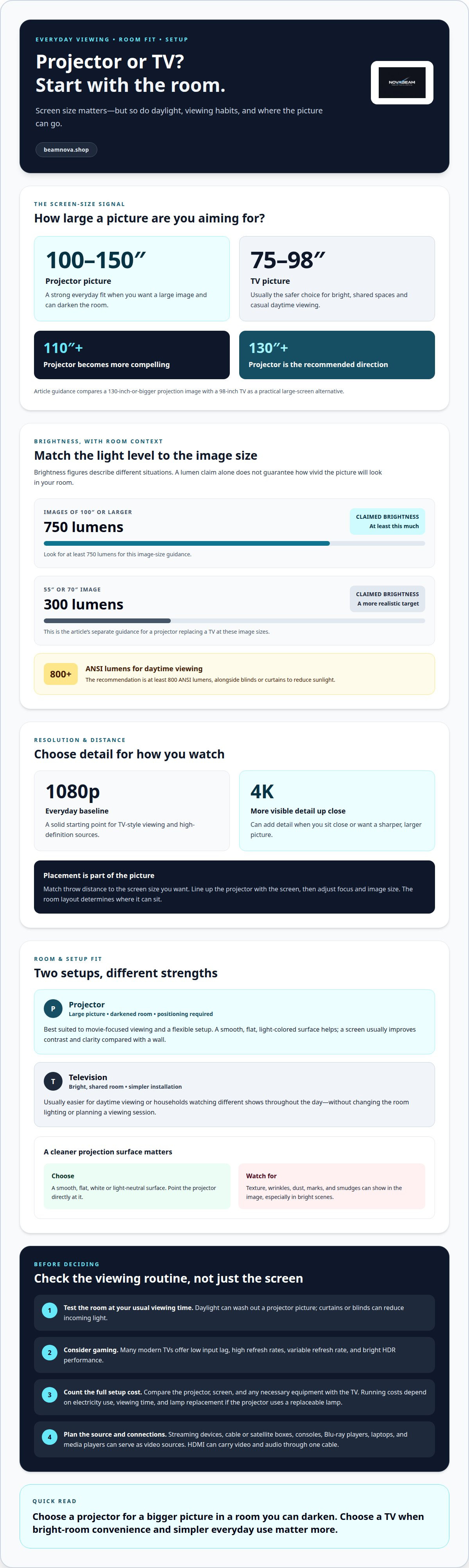
A projector can be a better everyday choice when you want a 100- to 150-inch picture and can make the room genuinely dark. Choosing a projector instead of a television is less compelling in a bright, shared room, where a 75- to 98-inch TV is usually the safer fit. The right choice depends on how you watch, not just how large you want the screen.
A television is ready for casual viewing, even when daylight fills the room. A projector instead of a television offers a more immersive scale for films, shows, and games, but the picture depends more on room lighting, the projection surface, and placement.
This guide explains when a projector can suit everyday TV viewing and how resolution, brightness, and throw distance shape the experience. Compare the main trade-offs, see when a television remains the practical choice, and use a straightforward decision guide to match your screen goals to your space.
Key Takeaways
- Choose a smooth, light-colored projection surface, and consider a screen for clearer contrast than a typical wall.
- Reduce daylight with blinds or curtains to help preserve picture visibility during daytime viewing.
- Match resolution to your viewing distance: 1080p is a solid everyday baseline, while 4K can add detail when you sit close.
- Plan projector placement around throw distance and screen size; a television may be the simpler fit for gaming or bright-room viewing.
When is a projector a good choice for everyday use?
A projector can suit everyday viewing when you want a 100- to 150-inch picture and can darken the room. A 75- to 98-inch television is usually the safer choice for bright, shared spaces.
Wall and Screen Projection
A projector screen provides a flat, light-colored surface, usually improving contrast and clarity compared with a wall. A wall can work, but texture, wrinkles, dust, marks, or smudges may show in the image, especially during bright scenes. For a cleaner picture, use a smooth surface and point the projector directly at it rather than relying on extensive digital correction.
Screen Preparation and Viewing Size
Before projecting, clear the viewing area and choose a flat, white or light-neutral surface. A screen usually produces a better image than projecting directly onto a wall, particularly in a brighter room. Size matters, too: a projector becomes more compelling at 110 inches or larger, while a 98-inch TV is a practical large-screen comparison. For a 130-inch image or bigger, a projector is the recommended direction.
Projector and TV Costs
Is a projector better than a TV for everyday viewing? It can be when a large picture and a dark room matter more than bright-room convenience. Otherwise, a television is often the simpler everyday choice. Compare the total purchase cost of the projector, screen, and any necessary equipment with the television you’re considering. Running costs depend on electricity use and viewing time, as well as lamp replacement if the projector uses a replaceable lamp.
Equipment and Home Setup
To replace a TV, connect a video source, such as a streaming device, cable or satellite box, console, Blu-ray player, laptop, or media player. HDMI can carry video and audio through one cable. Setup requires more positioning than a television: line up the projector with the screen, then adjust focus and image size. A TV is simpler to install, while a projector’s placement depends on the room layout and throw distance.
| Option | Screen size | Room fit | Setup |
|---|---|---|---|
| Projector | 100 inches and larger | Darkened room | Positioning required |
| Television | 75 to 98 inches | Bright, shared room | Simpler |
Choose a projector by matching your desired screen size to the room’s lighting and layout.
Choosing a projector for everyday TV viewing
For everyday viewing, choose a projector that suits your room’s lighting and usual entertainment. A movie-focused routine is a better fit than a bright room used for casual daytime TV.
Projector Viewing Benefits
A projector can make movie night feel more immersive, with a large display that stands apart from a standard television. It also suits viewers who switch between films, series, and occasional gaming on one flexible setup. For regular gaming, however, many modern TVs offer low input lag, high refresh rates, variable refresh rate, and bright HDR performance.
Let your viewing habits guide the decision. If evening movies dominate, a projector can make a spacious picture the centerpiece of home entertainment. If people watch different shows throughout the day, a television is often easier to use without changing the lighting or planning a dedicated viewing session. Consider who watches, when they watch, and whether gaming is a priority.
Daytime Viewing in Bright Rooms
How do projector and TV picture quality compare in bright rooms? Daylight can wash out a projector’s picture, while televisions usually perform better in bright conditions. For daytime projector viewing, the recommendation is at least 800 ANSI lumens, alongside blinds or curtains to reduce sunlight.
Test the room at your usual viewing time. Open curtains to see how much ambient light reaches the display, then close them to gauge how much control you have. If sunlight still floods the viewing area, a television will generally provide a more visible picture for daytime news, sports, or children’s programs.
Portability changes where you watch, not just how. A portable projector can move between rooms or outside for an evening movie, while a fixed television stays in one spot. For outdoor viewing, choose a dark setting and plan where the image and viewers will be positioned. Ambient light still affects visibility, even after sunset.
For a viewing setup centered on adaptable home entertainment, explore home projector options that suit your preferred routine.
Choosing projector resolution, brightness, and throw distance
For a balanced home theater picture, match resolution and brightness to your screen, room lighting, and viewing distance. Then make sure the projector can be positioned far enough away to create the image size you want.
Resolution Considerations
Resolution affects how much detail remains visible across a projected image. A 1080p projector is a solid baseline for everyday TV-style viewing, while 4K can add detail when you sit close or want a sharper, larger picture. For high-definition sources, choose 1080p or 4K resolution. Also consider the content and device sending the picture, since resolution depends on the source as well as the projector.
Brightness Specifications
Brightness claims need context: a lumen figure alone doesn’t tell you how the picture will look in your room. For images of 100 inches or larger, look for a claimed brightness of at least 750 lumens. A projector replacing a television with a 55-inch or 70-inch image has a different target: a claimed 300 lumens is more realistic. Compare like-sized images rather than treating a large number as a guarantee of a vivid display.
Brightness Across Room Conditions
Ambient light reduces picture visibility, so the same projector can look different in a dark home theater and a sunlit living room. TVs generally perform better in bright daylight. For projection, reduce incoming light with curtains or blinds, then assess the picture at your usual viewing time. A larger image spreads light across more screen area, making room conditions important when choosing brightness.
Throw distance determines where the projector needs to sit to create your target image size. Check the available distance from projector to screen before choosing a model. An ultra-short-throw projector can create a large image from just a few inches away, while other setups need more space. Position the projector to point toward the screen, rather than relying on extensive digital correction. Finally, confirm that your video sources connect as needed and consider separate speakers if you want fuller sound.
Projector benefits compared with a television
A projector’s clearest advantage is scale: it can make a living room feel like a theater. The trade-off is greater dependence on room conditions and careful placement.
Projector Benefits
For an image larger than 80 inches, a projector is often the most cost-effective route. It can create an immersive display for streaming films, live sports, or shared gaming without a television-sized panel dominating the room. Projectors often make particular sense for 110- to 120-inch viewing, where a large picture can become the centerpiece of movie nights and major events.
A complete home theater projector system may cost less than a 100-inch television. That comparison depends on the full setup, including the screen and other equipment, but it shows why projection appeals to viewers who prioritize scale.
Projector Drawbacks
What are the drawbacks of using a projector instead of a television? The image is more affected by ambient light, and setup requires suitable placement and a usable projection surface. TVs are simpler to install and usually perform better in bright rooms, making daytime sports or casual streaming less convenient with a projector.
Gaming involves another trade-off. TVs are often the easier, more flexible choice, and many modern models offer features such as low input lag, high refresh rates, and variable refresh rate. Projector performance depends on the model and setup, so viewers who prioritize responsive gameplay should weigh that need against the benefit of a larger image.
Use your routine as the deciding test. If evening films and a theater-like picture matter most, and you can control the room lighting, a projector may suit your living room. If the screen needs to stay bright for daytime viewing, or you want straightforward setup for sports, streaming, and gaming, a television may fit better. For a close call, compare a 98-inch TV with a 100- or 120-inch ultra-short-throw setup, then consider available placement and screen size.
Explore home projector options to find a setup that fits your room and viewing priorities.
NovaBeam: Compact 4K Cinema Projector
NovaBeam’s Compact 4K Cinema Projector is a natural option if you’ve decided a large projected picture suits your room and viewing habits. Use the criteria above to consider your available placement, lighting, preferred screen size, and the resolution you want before choosing a projector.
For a 1080p option, consider the CinemaView 1080p Projector. The HY300 Elite Cinema Projector and Cosmic Astronaut Projector offer other designs within the range. Each gives you a different direction to explore as you shape a home setup around films, shows, or shared viewing.
If a projector fits your space and everyday routine, visit NovaBeam to explore its projectors.
Shape a More Immersive Everyday Setup
Think about how entertainment fits into your home, not just how it looks on a screen. Consider the moments you want to elevate, from a quiet series after work to a shared film night or weekend gaming. That picture of your routine can help guide your choice of a projector instead of a television.
NovaBeam offers the Compact 4K Cinema Projector, CinemaView 1080p Projector, and HY300 Elite Cinema Projector. These options give you different paths to explore as you shape a setup around your viewing preferences. Let your room, content, and desired experience guide the decision.
Bring your questions and setup goals to NovaBeam as you consider what fits your home. Contact NovaBeam about your setup and take the next step toward a more personal home entertainment experience.
Frequently Asked Questions
Is It a Good Option to Buy a Living Room Projector Instead of TV?
Yes, a living-room projector can be a good choice if your household values a large shared picture and you can manage the room lighting. Consider who watches from different seats, where the image will fall, and how often you watch in daylight. For a family room used frequently during the day, a television may be simpler. For planned evening viewing, projection can make films feel more immersive.
Projector vs TV: Which Is Better for Your Home Theater?
A projector can suit a dedicated home theater when the room accommodates a large image and you can control ambient light. Consider the full seating layout, not just the main chair: viewers at the sides need a clear view, and everyone should be able to see the projection surface. A television may fit better when the room also serves as a bright, everyday living space.
What’s the easiest way to watch streaming apps on a projector?
Connect a streaming device or media player to the projector through HDMI, then open apps on that connected device. HDMI carries video and audio, so one cable handles the projector connection. Set up the streaming device’s internet access and sign in to your apps there. This keeps app navigation separate from projector controls and works with compatible streaming devices.
Do projectors need a sound system?
Not always. A projector with built-in speakers can play audio without a separate sound system, while external speakers can deliver fuller sound for films or sports. Check the specific projector’s audio features before choosing equipment, since they differ by model. Also consider where people sit: a small room may need a simpler setup than a larger home theater with several seating positions.
Projector vs TV Comparison: Which Should You Choose?
Choose a display that matches your daily routine. A projector is a strong fit when an immersive, large-format picture is the priority and your room can support it. A television is often more convenient for casual viewing, bright rooms, or frequent gaming. Before deciding, note your usual viewing times, preferred content, seating layout, and whether you want a fixed display or a flexible projection setup.
Quick answer: projector or TV?
Choose a projector for a more cinematic, large-screen experience in a room where you can control lighting and placement. Choose a television for straightforward everyday viewing, especially in a bright room or when gaming is a priority. If you’re considering a projector instead of a television, first decide how you’ll use the room most often, then match the display to that routine.