
How to Choose a Home Projector for Movies, Sports, Gaming, or Work
A projector is only as effective as the image it can deliver in your room. To understand how to choose a home projector, match resolution, brightness, screen size, and placement to what you watch and the light in your space. For movies and TV, a 16:9 aspect ratio suits the content, and a screen with a matching ratio keeps the image shape consistent.
A dedicated screen provides a consistent surface for the projected image, while its size and position shape the viewing experience. The best setup isn’t automatically the biggest or most powerful: a bright room, compact viewing area, and gaming setup each call for different priorities.
This guide explains how resolution affects movies and games, how screen size and brightness work together, and what placement and image correction mean in practice. You’ll also learn how to weigh these factors for sports and presentations, so your setup feels immersive, clear, and suited to everyday life.
Key Takeaways
- Match resolution to your source and viewing priorities, so added detail supports the content you actually watch or play.
- Balance screen size with room brightness; a larger image needs enough light to remain clear and vivid.
- Use throw distance and image-correction options to plan a placement that fits your room without compromising the picture.
- Prioritize different features for movies, sports, gaming, and presentations to find a setup that suits your everyday use.
Resolution: Why Upgrade to 4K?
Choose 1080p, 4K, or 8K by matching the projector’s native resolution to your video sources and viewing purpose. For home theater, 4K resolution with HDR compatibility is a strong fit for detailed movies.
Native Resolution and Video Sources
Native resolution is the number of pixels a projector can display directly. When it matches the source, such as a 4K Blu-ray player paired with a 4K projector, the image can show the source’s detail without scaling it to a different pixel count. A 1080p projector remains a sensible match for 1080p video. Consider viewing distance, too: at a closer seat, fine detail is easier to appreciate, while room lighting affects perceived image quality, not the source resolution.
Display Resolution and Pixel Counts
Display resolution describes the image’s pixel dimensions and total pixel count. Full HD, also called 1080p, is 1920×1080 pixels and about 2.1 million pixels. A 4K UHD display has about 8 million pixels, while an 8K UHD display has about 33 million. More pixels can reveal finer detail on a large image, but the content must also provide that detail. Match the display to the resolution you watch most, rather than choosing by pixel count alone.
For sports and gaming, resolution isn’t the only performance measure. A 120 Hz refresh rate is ideal for reducing motion blur in fast-moving action. Gamers can pair 4K resolution with a 4K-capable console, then weigh response and lag alongside image detail. Color accuracy also matters: Rec. 709 is the color gamut used for HDTV and home video releases. A projector’s light source and room lighting affect how vivid colors appear, so consider the viewing environment as well as the resolution.
Resolution and Projector Price Range
In the US, projector prices vary with resolution and other specifications, so there isn’t one useful range for every “good” home projector. Compare models by purpose: 1080p can suit Full HD viewing, while 4K supports compatible sources with more detail. An 8K display offers a higher pixel count, but its value depends on whether your content and setup can make use of it. Choose the resolution that fits your sources and viewing habits before weighing the overall cost.
Screen size and projector brightness
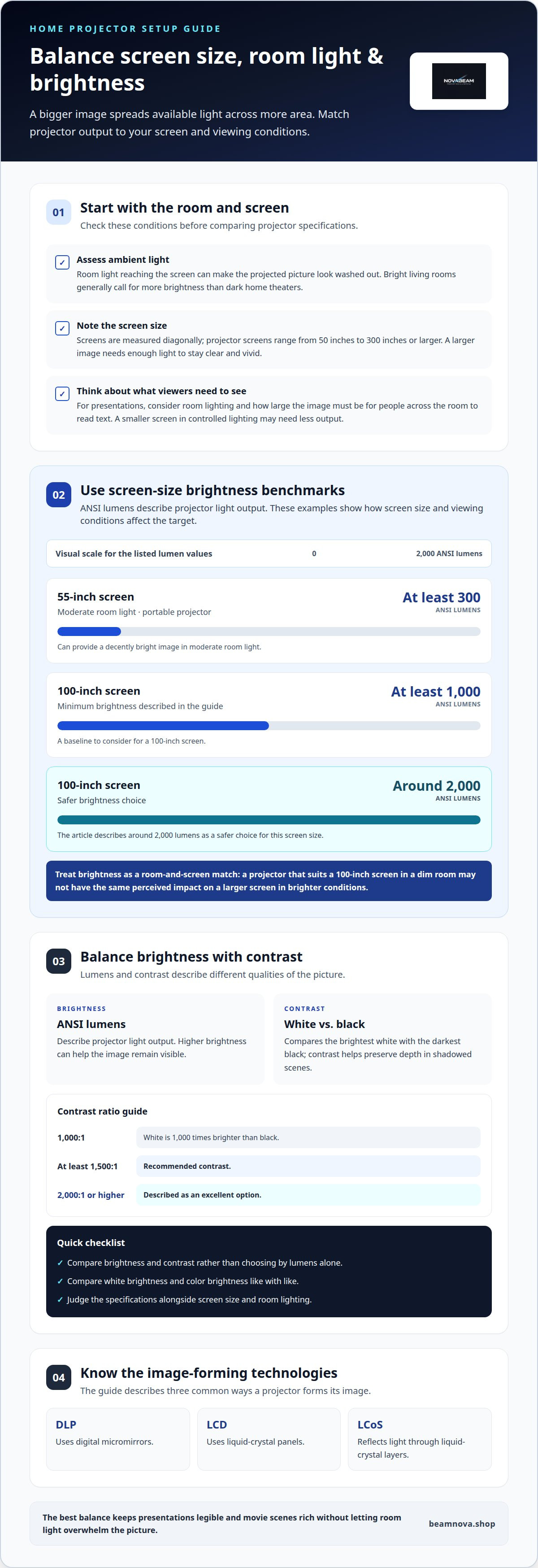
Screen size and brightness work together: a larger image spreads available light over more area. DLP uses digital micromirrors, LCD uses liquid-crystal panels, and LCoS reflects light through liquid-crystal layers. Each technology shapes how a projector forms its image.
Ambient Light and Brightness
Ambient light is the room light reaching the screen alongside the projector’s image. In a bright living room, that extra light can make a projected picture look washed out, so brightness matters more than in a dark home theater. For a 55-inch screen in moderate room light, a portable projector with at least 300 ANSI lumens can provide a decently bright image. For a larger screen or brighter space, choose brightness with the room and viewing conditions in mind.
Screen size is measured diagonally, and projector screens range from 50 inches to 300 inches or larger. A 100-inch screen should receive at least 1,000 ANSI lumens; around 2,000 lumens is a safer choice. For office presentations, consider the ambient lighting and how large the image needs to be for people across the room to read text. A smaller screen in controlled lighting may need less output than a large image in an open, bright space.
Brightness, Contrast, and ANSI Lumens
ANSI lumens describe projector light output, while contrast compares the brightest white with the darkest black. A 1000:1 contrast ratio means white is 1,000 times brighter than black. Contrast of at least 1500:1 is recommended, while 2,000:1 or higher is described as an excellent option. High brightness can help an image remain visible, but contrast helps preserve depth in shadowed scenes. For cinematic viewing, consider both specifications rather than choosing by lumens alone.
Brightness specifications can include white brightness and color brightness, which describe different aspects of the projected image. Compare like with like, and consider the screen’s size and the room’s lighting before settling on a model. For example, a projector that suits a 100-inch screen in a dim room may not create the same perceived impact on a larger screen under brighter conditions. The best balance keeps presentations legible and movie scenes rich without letting room light overwhelm the picture.
Ceiling mounting, table placement, and image correction
Plan placement around the screen, available throw distance, and cable reach to the inputs. Use a secure ceiling mount or stable table, leave space around the vents for airflow, consider fan noise near seating, and keep the vents clear during routine cleaning.
Placement Types and Throw Distance
Placement type describes how far the projector sits from the screen to create its picture. A standard throw model generally needs more room, while short-throw and ultra-short-throw models work closer to the screen. This distinction matters in a compact theater, where furniture or a walkway can limit available distance. A traditional projector generally needs at least 100 inches of distance to cast a 100-inch image, so assess the room before choosing a location.
Throw Ratio and Placement Flexibility
Throw ratio relates the projector’s distance from the screen to the width of its image. For example, a 1.8:1 throw ratio produces a 5-foot-wide image from 9 feet away. Use that relationship to estimate whether a projector can fill your screen from a ceiling mount or table. Lens zoom can offer extra flexibility: a 1.2x zoom creates an image up to 20% larger than the minimum size.
Image correction helps align the picture when the projector cannot sit directly in front of the screen. Lens shift retains 100% of the resolution in the projected image, making it useful when adjusting the picture’s position. Keystone correction can also reshape a skewed image, but avoid relying on correction to compensate for poor placement. Start with a level projector aimed squarely at the screen, then use available adjustments for precise alignment.
Before mounting, map the screen, projector, power source, and inputs together. A ceiling position keeps the floor clear, while a table placement makes moving the setup simpler. Leave room for ventilation and access to connections, and consider whether fan noise will distract from nearby seating. For a flexible home entertainment setup, explore projector entertainment options alongside your room layout.
Choosing a projector for movies, sports, gaming, or presentations
Start with your main use, then consider screen shape, motion, detail, and room setup. A projector for movie nights has different priorities from one used for gaming or presentations.
Movies: A 16:9 aspect ratio suits movie and TV viewing, keeping the image shape aligned with widescreen content. For a cinematic home setup, prioritize detail and contrast in dark scenes. A 4K projector can show a 4K source, such as a 4K Blu-ray player, at its intended resolution.
Sports: Fast action makes motion handling a key factor. A 120 Hz refresh rate is ideal for reducing motion blur during sports and gaming. Consider how much ambient light is present during daytime viewing, since a bright room can make the picture appear less vivid.
Gaming: Match the projector’s resolution to the console. If your console supports 4K, a 4K projector can display compatible games at that resolution. Refresh rate affects how smoothly motion appears, while input lag affects how quickly on-screen actions respond to controller inputs. Check both when gaming is a priority, especially for fast-paced play.
Presentations: Prioritize legible text and graphics at the screen size people will view. A portable projector can suit a room where the setup needs to move between locations, while a fixed home setup can favor a permanent screen position. Plan audio, too: a 3.5 mm output can connect a speaker by cable. That matters when presentation audio needs to reach viewers beyond the projector itself.
For mixed use, list your main activities before choosing. A household that watches films, follows sports, and plays games may need to balance resolution with motion handling. A projector used mainly for work should make slides readable in the room’s usual lighting. Let the dominant purpose guide your choice, then weigh secondary uses against it.
NovaBeam: Compact 4K Cinema Projector
NovaBeam’s Compact 4K Cinema Projector is a natural option if you’re prioritizing a 4K model for home viewing. Match that choice to your room, screen, and content: resolution is only one part of a satisfying setup, alongside brightness and placement. If Full HD better fits your viewing needs, the CinemaView 1080p Projector offers a 1080p option. The HY300 Elite Cinema Projector and Cosmic Astronaut Projector provide additional choices within NovaBeam’s range.
Narrow your preferences by considering what you watch, how much light the room receives, and where the projector will sit. This gives you a clearer basis for selecting a model that suits your everyday entertainment. Visit beamnova.shop to explore NovaBeam’s projector range.
Make Your Next Movie Night Feel Different
A home projector can create a shared setting for film nights, game sessions, and everyday viewing. Picture how you want the room to work, then choose a setup that fits your routine. That’s the heart of how to choose a home projector: make the decision around your space and habits, not one specification in isolation.
NovaBeam’s range includes the Compact 4K Cinema Projector, CinemaView 1080p Projector, and HY300 Elite Cinema Projector. Use your preferred viewing style to decide which direction feels right, then explore the options at your own pace. A well-chosen setup can make familiar entertainment feel newly immersive and give your living space a more cinematic character.
Contact NovaBeam about your setup and take the next step toward a more personal home-viewing experience.
Frequently Asked Questions
Why use a screen?
A projector screen gives the image a dedicated viewing surface, creating a consistent frame for movies, games, or slides. It also lets you choose a defined size and aspect ratio instead of adapting each setup to an available wall. For example, a screen can help preserve a widescreen film’s composition in a multipurpose room. Choose a surface that fits both your projector’s image shape and your room.
How do you know which projector to buy?
Start with what you’ll watch most, then match the projector to your room and sources. Movie fans may prioritize image detail and color, while gamers may value motion handling and responsive play. For presentations, readable text and suitable brightness matter. To decide how to choose a home projector, list your main use, available placement, and typical lighting, then compare models against those needs rather than choosing by one specification alone.
What projector brightness in ANSI lumens is best for a home theater or living room?
For a home theater, at least 1,000 ANSI lumens is a useful brightness target. A living room with daylight or lamps needs more light output than a darkened theater, especially for a large image. Consider how much light you can control during viewing and how large you plan to project. Compare ANSI lumen ratings, since the measurement helps evaluate projector brightness consistently.
What projector throw ratio and screen size fit my room dimensions?
Measure the distance from the projector lens to the screen and the wall space available for the image. Throw ratio connects that distance with image width, so the projector must produce your desired screen size from its planned position. For instance, a narrow room may call for a shorter-throw design. Check the projector’s throw range and screen dimensions together before choosing a ceiling or table location.
How much ambient light can a home projector handle, and do I need a light-rejecting screen?
Ambient light reduces perceived image contrast, making dark scenes and subtle colors harder to see in a bright room. Improve viewing by closing blinds, dimming nearby lights, or choosing a brighter projector. A light-rejecting screen may help manage light arriving from certain directions, but its suitability depends on the room and projector placement. Control light first, then decide whether a specialized screen suits your setup.
How do lamp, LED, and laser projector light sources compare in lifespan and replacement cost?
Estimated light-source life varies by type: standard projector lamps are listed up to 10,000 hours, LED sources up to 20,000 hours, and laser sources up to 20,000-30,000 hours. Replacement costs depend on the projector and the replacement part, so compare the specific model’s maintenance needs before buying. A longer estimated lifespan can reduce how often replacement is needed, but doesn’t establish its eventual cost.