
How to Choose a Compact Movie Projector for Your Space
The best compact movie projector for your room may not be the smallest one. It’s the model that fits your viewing distance, room lighting, and screen size. A streamlined design can make movie night easier to set up, but size alone won’t tell you whether the picture will look bright, sharp, or large enough on your wall.
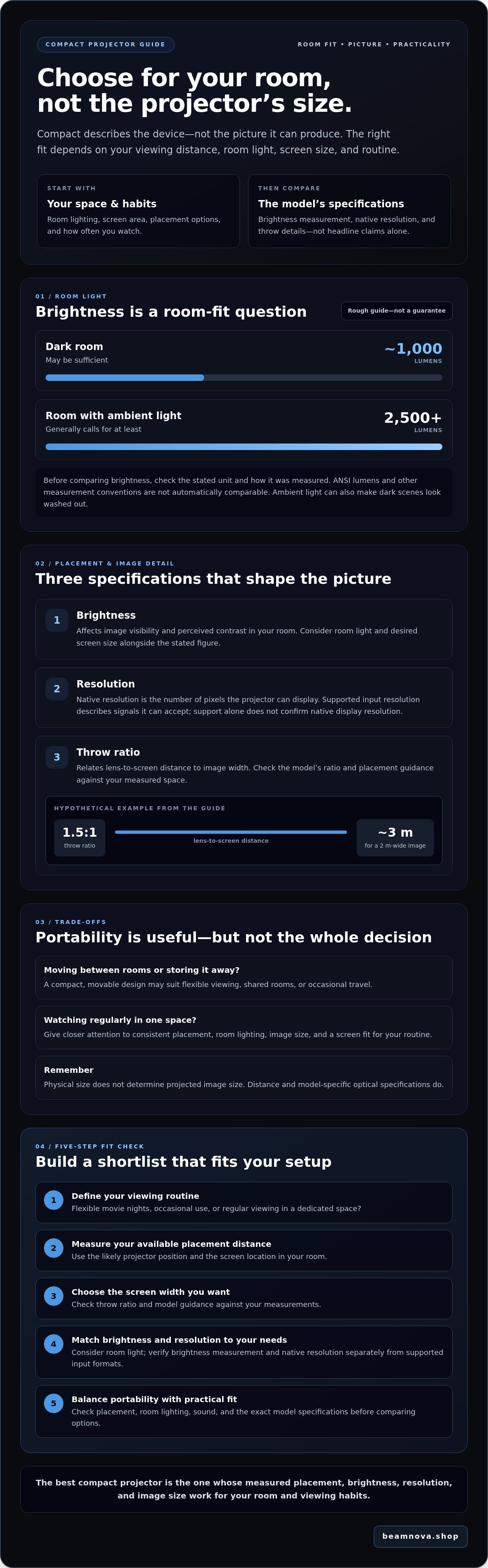
It’s reasonable to wonder whether a compact model can deliver the viewing experience you want. Brightness, resolution, and projection distance can make projector specifications feel like a maze. Start with your space and habits, then compare the figures that affect your setup. As a rough guide, around 1,000 lumens may be sufficient in a dark room, while rooms with ambient light generally call for at least 2,500 lumens. Check how the brightness figure is measured before comparing models.
This guide explains how brightness affects viewing in different light, how resolution shapes image detail, and how throw distance influences screen size. Use those basics to compare models against your room, movie-watching routine, and picture preferences.
Key Takeaways
- Choose a compact movie projector based on your room and viewing routine, not its size alone.
- Measure the available placement distance and the screen width you want before comparing models.
- Check how manufacturer brightness figures are measured, and distinguish native resolution from supported input resolution.
- Balance portability with practical needs such as placement, room lighting, and sound.
- Use the five-step checklist to build a shortlist, then verify each model’s specifications, including NovaBeam’s Compact 4K Cinema Projector.
What makes a compact movie projector a good fit for your room?
A compact movie projector is defined by its space-saving form, not by a guaranteed level of picture performance. Its smaller size may make it easier to move between rooms or store between uses, but it doesn’t tell you how bright or detailed the image will be. For an overview of how projection works and the technologies involved, explore this guide to video projector technology.
Compactness describes the device, not the image it can produce. The viewing experience depends on how the projector’s specifications work with your room. Ambient light can affect how vivid the picture appears, while projection distance and the model’s optical specifications influence image size and placement. Your available wall or screen area matters too. A large image may not suit a narrow room or the distance at which you’ll sit.
Think about how you’ll use the projector. A model that can be moved or put away may suit flexible home viewing, a shared room, or occasional travel. If you watch movies regularly in a dedicated space, consistent placement and a good fit for your screen may matter more than portability. In either case, compare the exact model’s specifications with your intended setup instead of treating compact design as a shortcut to performance.
Which movie-watching situations suit a compact projector?
Portability is useful when movie night moves from one room to another or when the projector needs to be stored between uses. For casual viewing, a setup that adapts to different spaces may be a priority. Frequent home-cinema viewing calls for closer attention to placement, room lighting, image size, and the specifications that suit your routine. Check that the model fits the room where you’ll use it most.
Does a smaller projector mean a smaller picture?
No. The projector’s physical dimensions and the projected image’s dimensions are different things. Image size depends on the distance between the projector and the screen, as well as model-specific optical specifications, including throw characteristics. That doesn’t mean every small projector can create the same image from the same position. Measure the distance available between the likely projector position and the screen, then check the model’s guidance for that setup.
How brightness, resolution, and throw distance shape a compact projector's picture
Specifications are most useful when you know what they describe. For a compact movie projector, compare brightness measurement conventions, actual pixel resolution, and the distance needed to create your intended image. A model’s headline figures alone won’t tell you whether it fits your room.
How bright should a compact movie projector be?
Brightness is commonly listed in lumens, but measurement methods can differ. Check whether a figure is given in ANSI lumens or another unit before comparing models. Treat claims measured on different bases with caution. Ambient light can also affect perceived contrast, making dark scenes look washed out. Consider how well you can control light and how large an image you want rather than relying on a universal brightness threshold.
What do resolution and throw ratio tell you?
Native resolution is the number of pixels the projector can display. Supported input resolution describes the signal formats it can accept. Support for a higher-resolution signal doesn’t by itself confirm that the image is displayed at that resolution. Throw ratio relates the lens-to-screen distance to image width. For example, a hypothetical 1.5:1 ratio would require about 3 metres of distance for a 2-metre-wide image. Confirm each model’s native resolution and throw details before choosing.
Specification | What it affects | What to verify
Brightness | Image visibility and perceived contrast in your room | The stated unit and measurement convention; consider room light and screen size too
Resolution | The detail the projector can display | Native resolution separately from supported input formats
Throw ratio | The distance needed to produce a given image width | The model’s ratio and recommended placement range; compare them with your measured space
Use these figures as a practical fit check. Measure the screen width you want, then use the throw ratio to estimate the placement distance. If your available space doesn’t work with that estimate, check the product’s guidance for its optical range. Don’t assume another compact model will place the image the same way. PCMag’s top-rated compact projectors can offer another point of comparison, but verify specifications on each model’s product page. You can also compare NovaBeam projector options against your room measurements and image priorities.
Compact movie projector trade-offs: portability, room light, and sound
A compact movie projector can make it easier to change where you watch, but portability is useful only if the projector can be positioned appropriately in each space. Moving it between rooms may mean adjusting placement and screen alignment each time. A projector that stays in one room can be set up more consistently, which may better suit a regular viewing routine.
Room conditions can shape the viewing experience as much as projector size. Light, placement space, and sound all affect how well a setup suits your movie nights.
When does portability matter more than a permanent setup?
Start with your routine. Will the projector stay in one room, move around the home, or travel occasionally? A flexible setup can suit shared rooms and casual movie nights. A dedicated viewing space may benefit from a repeatable projector position and seating arrangement. Before choosing, check the exact model’s weight, dimensions, power requirements, and included accessories. These details show what moving and setting it up will involve.
Can a compact projector work in a bright room?
Compact size doesn’t guarantee a bright picture in a lit room. Ambient light can reduce perceived contrast and make dark scenes harder to see, even when the image is visible. If you expect to watch during the day, consider whether curtains or another way to reduce light will suit the room. Think about your preferred screen size and viewing expectations, then compare them with verified brightness details for the specific model.
Check sound separately. Look for clear product information about built-in audio and any connections for other sound equipment. Don’t assume a compact design includes a particular speaker setup or that built-in audio will match your preferences. For dialogue-focused viewing, consider how speech will sound from your usual seating position. For a more enveloping movie night, check which audio options the model supports.
Before shortlisting, note which trade-offs matter most:
- Move it often: Verify weight, dimensions, power needs, and what’s included.
- Watch with room light: Consider light control alongside brightness specifications.
- Prioritize sound: Confirm the built-in audio details and supported connections.
- Prefer a consistent setup: Check that the placement suits your intended viewing space.
The right compact movie projector is the one whose verified specifications fit both your room and your routine, not simply the one that’s easiest to carry.
How to choose a compact movie projector in five practical steps
A useful comparison starts with your room, not a product label. Use these five steps to turn your viewing preferences and measurements into a practical checklist for evaluating a compact movie projector.
- 1. Define how you’ll use it. Note whether it’s mainly for movies, shared-room viewing, or occasional portable entertainment. Include how often you’ll watch and whether you need to store or move the projector between uses.
- 2. Measure the placement. Record the room dimensions, the distance from the planned projector position to the screen, and your intended screen width. These measurements help you check whether a model’s throw specifications suit the space. Use the same measurements when comparing every candidate.
- 3. Assess the light. Note whether you’ll watch in a darkened room or with daylight and lamps present. Consider whether you can reduce incoming light, since room conditions affect how clearly the picture comes through.
- 4. Set your image priorities. Decide what matters most: native resolution, image size, or fitting the projector into a particular placement distance. Compare native resolution with supported input formats, and check brightness figures alongside their measurement conventions. A “4K” label or a brightness number alone doesn’t describe the full picture.
- 5. Verify connections. List the playback devices you plan to use, then check each model’s product details for the connections those devices require. Confirm the exact supported inputs rather than assuming similar-looking models offer the same options.
Keep your notes consistent across every candidate. A comparison sheet can include room dimensions, projector-to-screen distance, intended screen width, expected room lighting, native resolution, brightness measurement and value, throw ratio, supported input formats, and required connections. If a specification is missing or unclear, flag it for confirmation rather than filling the gap with an assumption.
Once your requirements are clear, assess available options against them instead of choosing by category name alone. You can Explore NovaBeam's projector range and compare the listed model specifications with your measurements and priorities.
Choose your compact movie projector shortlist and take the next step
A useful shortlist reflects how you’ll watch, where the projector will sit, and what picture you expect. Don’t let one headline specification decide. Use your measurements and viewing priorities to rule out models that don’t fit, then confirm the details for each remaining option on its current product page.
Which criteria should make your final shortlist?
Keep a model in consideration only if its verified throw details suit the available placement distance and intended screen width. Assess native resolution and brightness claims in relation to your image expectations and room conditions. If portability matters, check the specific model’s dimensions, weight, power needs, and included components. Confirm required connections, too. A compact movie projector is a good candidate when its documented specifications work together for your setup, not simply because it carries a particular label.
- Room fit: Does the listed throw information match your measured projector-to-screen distance?
- Picture priorities: Are native resolution and brightness details clear enough to assess against your viewing conditions?
- Everyday practicality: Are the connections, portability details, and included components confirmed in the listing?
NovaBeam’s Compact 4K Cinema Projector is one model you can evaluate against those criteria, not an automatic recommendation. Check its current product listing for verified specifications, then compare it with other options using the same checklist. For broader setup guidance, the compact 4K cinema projector guide is another topic to explore.
How can you make a confident purchase decision?
Before checkout, verify that the product page shows the exact model name and the specification details relevant to your room. Don’t infer brightness, resolution, connections, or included accessories from product images or category labels. If a detail you need is missing or unclear, resolve that question before deciding.
Revisit your comparison notes before making a decision. The best fit is the model that meets your placement, image, and routine requirements as a whole, rather than the one with the most appealing single claim. Compare the verified product specifications with your checklist when reviewing NovaBeam projectors.
Make Your Movie Space Your Own
The right compact movie projector fits the room and the way you watch, not simply the one with the smallest footprint or boldest headline specification. Keep your measurements close, compare brightness and resolution claims carefully, and confirm that throw details and connections match your setup. These practical checks can help turn a promising shortlist into a confident choice.
Before deciding, revisit the model’s current product information and resolve any missing details rather than assuming features from its name or appearance. NovaBeam’s projector range includes options to evaluate against your needs, but the best fit depends on verified specifications and your priorities.
Frequently Asked Questions
Is a compact movie projector good for home use?
Yes, a compact movie projector can suit home viewing if its specifications match your room and routine. Its smaller form can be convenient for shared spaces or setups that need to be moved or stored. Before choosing, check the model’s native resolution, brightness measurement, throw details, and connections. These details help you assess whether it can create the image and setup you want at home.
Can a compact projector create a large movie image?
Yes, some compact projectors can produce a large image, but the result depends on the particular model and its placement. Image width is related to the projector’s distance from the screen and its throw ratio. Measure your available distance and desired screen width, then check the model’s specifications or placement guidance. Don’t assume two similarly sized projectors can create the same image from the same position.
What resolution should I choose for a compact movie projector?
Choose resolution according to your image-detail expectations and intended screen size, and check native resolution rather than relying only on supported input formats. Native resolution describes the pixels the projector can display; supported formats describe signals it can accept. Full HD is a common home-viewing choice, while 4K may be worth considering for a larger image or a preference for finer detail. Verify both details for the exact model.
Can I use a compact movie projector in a bright room?
You can use one in a bright room, but ambient light may make the image look less vivid and dark scenes harder to see. Results depend on the projector’s verified brightness, screen size, and room conditions, so don’t assume a compact design guarantees daytime clarity. If possible, reduce incoming light with curtains or blinds. Then compare the remaining room conditions with the specific model’s brightness information.
How do I know if a compact projector will fit my room?
Measure the distance from the planned projector position to the screen, the available room dimensions, and the screen width you want. Compare those measurements with the model’s throw ratio or placement guidance to check whether the image can fit your space. Also consider where people will sit and whether the projector can be positioned securely. Verify the exact model’s requirements before deciding.
Do compact movie projectors have built-in speakers?
Some may, but don’t assume every compact projector includes built-in speakers or the same audio capabilities. Check the exact product listing for speaker information and any supported audio connections. If you already have speakers or another sound system, confirm that the projector has compatible connections for your equipment. Consider where you’ll sit and how you prefer to hear dialogue before treating audio as a minor detail.
Explore NovaBeam’s projector range and compare the available models with your room measurements and viewing priorities.