
Home cinema projector: choose a portable or home model
A portable home cinema projector is a practical choice if you want to move it between rooms or put it away after viewing. Choose a home-focused model when you have a regular viewing space and want a dedicated cinema setup. The right fit depends on the room, your planned screen size and the picture quality you want.
A permanent setup may seem like the obvious route to a more satisfying viewing experience, but flexibility matters too. A projector that suits your space and habits can make movie nights more immersive without making everyday living less comfortable.
This guide compares portable and home projectors, explains which picture-quality details matter and helps you match a model to your room and screen. By the end, you’ll have a practical way to decide which style suits your home.
Key Takeaways
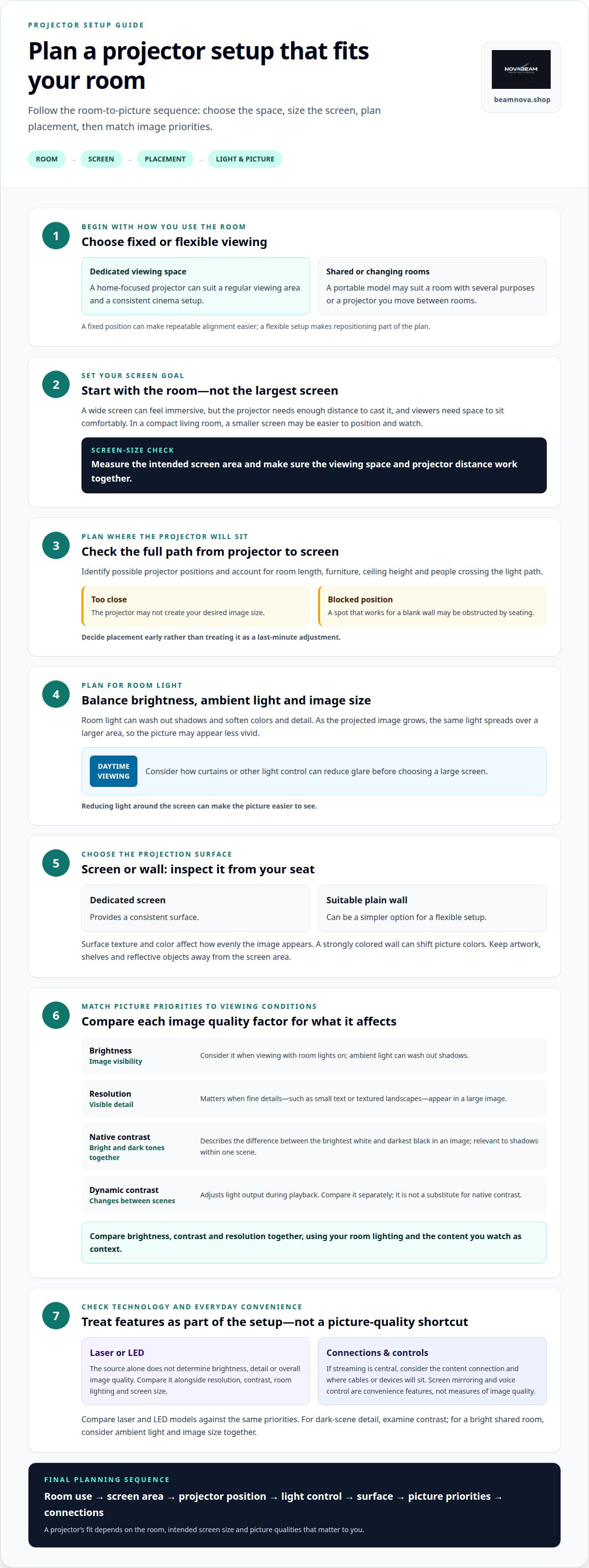
- Compare brightness, contrast, and resolution together to judge how a projector will look in your viewing conditions.
- Choose a model around your room layout and intended screen size, so placement supports the image you want.
- Understand how a laser light source can shape the viewing experience before deciding whether it suits your setup.
- Use color performance and your picture-quality priorities to narrow down the right projector style for your home.
Projector brightness, contrast, and resolution
Brightness, contrast and resolution each shape the image differently. A bright living room, for example, calls for different considerations than a dedicated cinema space used with dim lighting.
Brightness and Resolution
Brightness affects how well an image holds up against room light, while resolution determines how much detail it can show. In a bright room, ambient light can wash out shadows; reducing light around the screen can make the picture easier to see. Resolution matters most when fine details, such as small text or textured landscapes, appear in a large image. When choosing a home cinema projector, consider both your room’s lighting and the content you watch.
Native and Dynamic Contrast
Native contrast describes the difference between the brightest white and darkest black a projector can produce in an image. Dynamic contrast adjusts light output during playback, so a dark sequence may look different from a bright one. Compare these terms separately rather than treating a dynamic figure as a substitute for native contrast. For instance, black levels matter more in a dimly lit scene than in a bright sports broadcast.
| Priority | What it affects | Practical example |
|---|---|---|
| Brightness | Image visibility | Viewing with room lights on |
| Resolution | Visible detail | Reading small on-screen text |
| Native contrast | Dark and bright tones together | Shadows within one scene |
| Dynamic contrast | Changes between scenes | Moving from a dark scene to daylight |
Choose the row that matches your main viewing conditions, then compare projector settings against that priority.
Screen mirroring sends compatible content from a phone or computer to a projector, while voice control lets you use spoken commands for supported functions. Mirroring can make a personal photo slideshow easier to share, for example, and voice commands can simplify basic navigation. Treat these as convenience features, not measures of image quality: neither changes brightness, contrast or resolution.
Choosing a projector for room and screen size
Start with the room, not the largest screen you can fit. A wide screen can create an immersive image, but the projector needs enough distance to cast it, and viewers need room to sit comfortably. In a compact living room, a smaller screen may be easier to position and watch than an image that fills the entire wall.
Brightness and screen size work together. As the projected image grows, the same light spreads over a larger area, so the picture may appear less vivid. Room light can also soften colors and detail. If you often watch during the day, plan how curtains or other light control can reduce glare before choosing a large screen.
Measure the intended screen area, then identify possible projector positions. Account for room length, furniture, ceiling height and whether people might cross the light path. A projector placed too close may not create your desired image size, while a spot that works for a blank wall could be blocked by seating. Plan placement early rather than treating it as a last-minute adjustment.
A dedicated screen provides a consistent surface; a suitable plain wall can be a simpler option for a flexible setup. Surface texture and color affect how evenly the image appears, so inspect the wall from the viewing seat. A strongly colored wall, for example, can shift the picture’s colors. Keep artwork, shelves and reflective objects away from the screen area so they don’t compete with the image.
Finally, match functionality to how you watch. If streaming is central, consider how your content source will connect and where cables or devices will sit. A portable model may suit a room that serves several purposes, while a fixed viewing area can make a home-focused setup easier to position consistently. Compare options at NovaBeam projector options as you refine your room plan.
Laser light sources
A projector’s light source provides the illumination that forms its picture. Laser and LED models use different technologies, but the source alone doesn’t determine brightness, detail or overall image quality. A laser projector casting a large image in a bright room, for example, can look less vivid than the same device in a darker space.
Laser models use laser light, while LED models use light-emitting diodes. This distinction can help you compare projectors, but it doesn’t replace checking their image specifications. Consider the light source alongside resolution, contrast, room lighting and screen size. Projectors with different light sources can still suit similar viewing needs.
Begin with how you’ll use the room. A dedicated movie space used mostly after dark calls for different priorities than a shared room for films, games and presentations. In either case, compare stated brightness and image characteristics rather than assuming “laser” guarantees a brighter picture. Both a large projected image and daylight can affect how vivid the result looks.
Flexibility matters as well. If you move a projector between rooms, consider where it will sit, which screen or wall it will use and how often you’ll adjust the setup. A fixed position in a dedicated space makes repeatable alignment easier. For a projector used for different activities, ease of repositioning and access to connections may matter as much as the light source.
Use a simple comparison process: identify your main viewing room, decide whether the projector will stay in one place, then compare laser and LED models against the same picture-quality priorities. If dark-scene detail matters most, for example, examine contrast alongside the light source. If you’ll use the projector in a bright shared room, consider ambient light and image size together. This keeps your decision grounded in your setup, not just a technology label.
Home theater projector picture quality
A convincing home theater image depends on more than resolution. Color range, contrast, content and placement all shape how movies look on screen. Judge the picture from your usual seat, under the lighting you expect during viewing, rather than relying on a specification alone.
Color gamut describes the range of colors a projector can reproduce. DCI-P3 has a range 26% larger than sRGB/Rec.709, so a projector that covers more of that space can display a broader palette in compatible content. The difference is most meaningful when the movie itself contains those colors. A vivid scene can still look restrained if the source content or picture settings limit its color range.
What are the best home cinema projectors for gaming? Look for a model whose resolution and picture quality suit your screen, then compare gaming features such as input lag and refresh rate. In fast-paced games, responsive controls may matter more than a feature designed to improve movie viewing.
How much does a good home theater projector cost? Cost depends on factors such as resolution, light source, brightness, contrast and gaming features. Compare these against your room and main use: a dedicated movie setup and a shared gaming room may call for different priorities.
For a more consistent picture, place the projector squarely toward the screen and keep the viewing area free from stray light. Then use a familiar movie scene to adjust picture settings: check shadow detail in a dark sequence, skin tones in a close-up, and color in a bright landscape. These examples help reveal whether the image feels balanced across different scenes, rather than impressive in only one. Explore projectors for home theater viewing as you refine your picture-quality priorities.
NovaBeam: Compact 4K Cinema Projector
NovaBeam’s Compact 4K Cinema Projector gives you a named option to explore if a compact 4K model fits your home viewing plans. If you’re comparing different resolutions or styles, the CinemaView 1080p Projector and HY300 Elite Cinema Projector offer additional choices; the Cosmic Astronaut Projector brings a novelty design into the mix.
Use your room, screen plans, and picture priorities to decide which direction suits you. A compact 4K option may appeal if you’re focused on that format, while a 1080p model is a distinct resolution choice. The novelty design serves a different purpose from a straightforward cinema setup, so consider the experience you want in your space.
Explore the options at beamnova.shop and choose the projector that best matches your home.
Make room for your next great viewing night
A home cinema projector is about more than choosing a screen. It can shape a relaxed evening around a film, a game or a shared event. Let the way you use your room guide your decision, then plan the details, from seating to where the image will appear.
Before choosing a position, picture an ordinary evening in the room. Think about where viewers will sit, what else the space needs to accommodate and whether the setup should stay put or move between uses. A thoughtful arrangement can make entertainment feel at home without taking over the room.
Give yourself room to choose a setup that suits your habits and the atmosphere you want to create. For a next step, ask NovaBeam about your setup. Your ideal viewing space starts with a choice that feels right for home.
Frequently Asked Questions
Should I buy a portable or a home projector?
Choose a portable projector if you’ll move it between rooms, take it to a gathering or put it away after viewing. A home-focused model suits a regular spot for films and games. Think about a typical week: carrying a projector between a bedroom and living room calls for flexibility, while a permanent media area favors a consistent setup.
What is a short-throw projector?
A short-throw projector is designed to create a large picture from relatively close to the screen. It can suit a room where a longer throw would put the projector behind the seating or leave little space to move around. Compare its placement requirements with your furniture layout and intended screen position rather than assuming every short-throw model suits every compact room.
What is the best overall projector?
There isn’t one best projector for every room and viewing habit. If true 4K resolution is your priority, NovaBeam’s Compact 4K Cinema Projector is a relevant option; it also includes built-in speakers and HDMI, USB, and Wi-Fi connectivity. For someone who values a simpler connection routine, those features may matter as much as resolution. Start with your main use, then compare the features that support it.
What is the best projector for outdoor movies?
Choose a portable projector intended for indoor or outdoor use, then plan the setting around it. NovaBeam’s Compact 4K Cinema Projector is described as portable and suitable for both. For a backyard movie night, consider where the picture will fall, whether seating has a clear view, and how you’ll connect the content source. Treat outdoor suitability as intended use, not as a claim of weather resistance.
What kind of projector should I get?
Match the projector to the content and resolution you care about most. NovaBeam’s CinemaView 1080p Projector offers 1080p resolution, while its Compact 4K Cinema Projector is specified as true 4K Ultra-HD. If your viewing is mostly everyday video, one resolution may suit your needs; if fine image detail is a priority, compare the 4K option against your source content and screen plans.
Which projector has the best picture quality?
For the highest stated resolution among NovaBeam’s listed cinema models, the Compact 4K Cinema Projector offers true 4K Ultra-HD. That makes it a fit for viewers prioritizing resolution, but a sharp picture also depends on compatible source content and careful focus. If you’re choosing between that model and the CinemaView 1080p Projector, decide whether 4K detail or a 1080p image better suits your viewing priorities.