
4K vs 1080p Projectors: Which Fits Your Home Theater
The 4K vs 1080p projector choice depends on the size of your screen, how close you sit, and the detail you want to see. 4K delivers 3840 × 2160 pixels, four times the detail of 1080p’s 1920 × 1080, but that extra clarity matters most on a large screen or at a close viewing distance. For outdoor movies, 1080p can be a strong fit when the projector has enough brightness for the screen.
It’s natural to assume the higher resolution always creates the better home theater. In practice, screen size, viewing distance, ambient light, and content all shape the experience. This guide compares image clarity, screen size, viewing distance, and outdoor use to help you choose a projector that suits your space, whether you’re planning a relaxed backyard screening or a dedicated cinematic room.
Key Takeaways
- Match resolution to your screen size and seating distance; added detail is easier to appreciate on a larger display or from closer seats.
- For outdoor viewing, consider whether the projector has enough brightness for your screen and setting before prioritizing resolution.
- A 1080p projector displays 4K content at 1080p, so choose a projector capable of 4K output to see the source at its original resolution.
- Control ambient light to bring out contrast, and weigh image clarity alongside the viewing experience you want from your home theater.
Which one to choose for outdoor home theater?
Native 4K displays 3840 × 2160 pixels, while 1080p displays 1920 × 1080 pixels. That means 4K resolution contains four times as many pixels as 1080p. A projector must output 4K to show 4K content at that resolution; a 1080p model displays it at 1080p instead.
For everyday television, movies, and gaming on a moderate-sized screen, 1080p can deliver a detailed home theater picture. Its resolution is about 2.1 megapixels, or over two million pixels. 4K resolution exceeds eight million pixels, which can reveal finer image detail when the screen and viewing setup make those extra pixels visible.
For outdoor use, match brightness to screen size. A Full HD projector can work well for an outdoor screening when it provides enough brightness for the screen and conditions. Consider where the screen will sit and how much ambient light reaches it, then choose a projector and screen suited to that setting. Resolution alone doesn’t determine how clear or visible the image will look.
| Option | Resolution | Pixel count | Useful fit |
|---|---|---|---|
| 1080p | 1920 × 1080 | About 2.1 megapixels | Moderate screens, everyday viewing |
| 4K | 3840 × 2160 | More than eight million | Greater detail on suitable large displays |
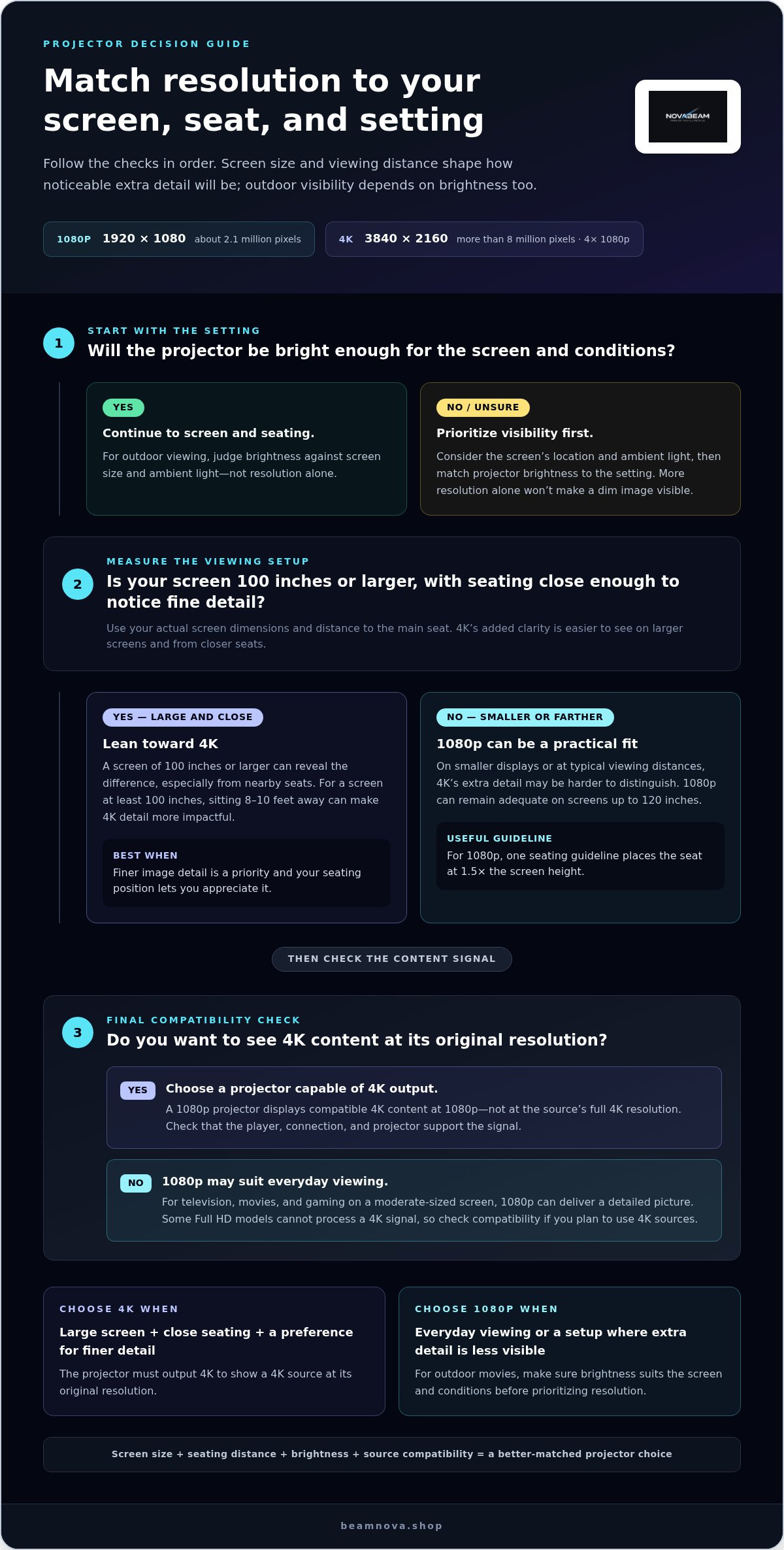
Use this simple sequence: choose the screen size, consider your seating distance, then match projector brightness to the setting. A 1080p projector may be the practical choice for everyday viewing or an outdoor screen with suitable brightness. Choose 4K when finer detail is a priority and your screen and viewing position let you appreciate it. For backyard movie nights, weigh visibility and image detail together, rather than treating resolution as the only measure of picture quality.
4K vs 1080p Projectors: Which Is the Best Home Projector for You?
Choose based on the source you watch, the projector’s output, and whether gaming response matters. A 4K label alone doesn’t settle compatibility, image detail, or value.
4K Content on 1080p Projectors
A 1080p projector can display 4K content only if it accepts that signal; some Full HD models cannot process it. When compatible, the image is still output at 1080p, not the source’s full 4K resolution. Upscaling can adapt a lower-resolution image, but it doesn’t add the source detail of native 4K. Match the player, connection, and projector before playback.
Content Availability and Image Quality
4K content is becoming more widespread on Netflix, Amazon Prime Video, and YouTube, while 1080p remains a practical format for everyday viewing. Native 4K content shown by a 4K-capable projector retains more source detail than 1080p output. For movies, sports, and gaming, consider whether your content is available in 4K and whether finer detail matters on your screen.
Pixel-Shifting and Native 4K
Native 4K uses a display structure with 3840 × 2160 pixels. Pixel-shifting presents image elements in multiple positions to create a higher-resolution-looking image, rather than relying on a native 4K pixel structure. Both approaches aim to show more detail than 1080p, but they achieve it differently. Compare the projector’s stated resolution method, not just its 4K label.
Input Lag in 4K and 1080p Models
Resolution alone doesn’t determine input lag. The projector’s image processing, signal settings, and gaming mode can affect how quickly an action appears onscreen. A 1080p model isn’t automatically faster, and a 4K model isn’t automatically slower. For console play, compare the input-lag performance for the resolution and signal mode you plan to use.
For a budget-focused US choice, the best fit is a model that matches your resolution needs and accepts your source. Cost depends on resolution, brightness, optics, and processing, so weigh those features against your intended use. Compare projector options as you narrow your home theater setup.
Screen size and viewing distance
Screen dimensions and seating position work together: the same display can reveal different levels of detail from different seats. Use your planned screen size and viewing distance to judge whether 4K’s added clarity will be noticeable.
Screen Size Considerations
Resolution differences become easier to see on screens of 100 inches or larger, especially when viewers sit close. On a smaller display, the extra detail in 4K may be harder to distinguish at typical viewing distances. A 1080p image can remain adequate on screens up to 120 inches, so consider how the picture looks from your actual seats before choosing higher resolution.
A 120-inch screen viewed from nearby makes fine details more visible than the same image viewed across a large room. Screen size alone doesn’t decide the result: seating distance changes how much detail reaches your eyes. Plan both together, rather than choosing a larger screen first and treating resolution as an afterthought.
Viewing Distance Recommendations
For 1080p, one viewing guideline places the seat at 1.5 times the screen height. For 4K, sitting 8-10 feet away from a screen at least 100 inches can make the added detail more impactful. These recommendations offer different starting points, not a single rule for every room. Screen dimensions and where your seats fit should guide the final layout.
Resolution tends to matter more when viewers sit less than 10 feet away. A 120-inch fixed-frame screen can make 4K’s clarity improvement unmistakable, while smaller screens and typical viewing distances can make that difference harder to see. Before settling on a projector, measure from the screen to your main seat and compare that distance with the screen height. Then consider whether your room allows closer seating without compromising comfort or layout.
Use those measurements to narrow your choice: prioritize 4K for a large screen and close seating, or consider 1080p when your screen and seating make the extra detail less visible. A thoughtful layout lets the display feel immersive without making resolution the only decision.
Image clarity, contrast, and HDR
Resolution affects fine detail, but contrast and color also shape how movies look. Judge picture quality by considering the source, projector, and room together, rather than by resolution alone.
Image Clarity and Color
4K can render finer details than 1080p when the movie source contains that detail and the projector can display it. Resolution doesn’t automatically create richer color: color depends on the source and the projector’s image reproduction. For example, compare a detailed 4K landscape with its 1080p version, then notice both fine textures and the accuracy of greens and blues.
Keep the content source consistent when comparing two projectors. A 4K film viewed at 1080p output won’t show its full source detail, while a 1080p movie can’t gain original 4K detail through a higher-resolution display. This makes source quality an important part of a fair image comparison.
Contrast and HDR
Contrast describes the separation between bright and dark parts of an image. A contrast ratio expresses that relationship, but the number alone doesn’t tell you how movies will look in your room. Ambient light affects perceived contrast, so control surrounding light to help both 1080p and 4K projectors produce deeper-looking dark scenes.
HDR can carry a wider range of brightness and color information in compatible content. The result depends on the HDR source and how the projector handles that signal. Resolution and HDR describe different aspects of the picture: 4K concerns image detail, while HDR concerns brightness and color range. One doesn’t guarantee the other.
For a practical comparison, dim the room, use the same movie scene, and compare bright highlights against shadow detail. This makes it easier to judge contrast beyond a specification label. If you’re choosing a 4K model for movie viewing, explore 4K projector options for your home theater.
NovaBeam: Compact 4K Cinema Projector
NovaBeam’s Compact 4K Cinema Projector is an option to consider if you’ve decided that 4K suits your screen, seating distance, and viewing priorities. If 1080p better matches your home theater plans, the CinemaView 1080p Projector offers a Full HD alternative.
Choose between them based on the viewing experience you want, not the resolution label alone. Consider your content, room lighting, and screen setup together. NovaBeam also offers the HY300 Elite Cinema Projector and Cosmic Astronaut Projector for different home entertainment styles.
Explore NovaBeam’s projector options at beamnova.shop to find a model that fits your setup.
Shape a Home Theater That Feels Like Yours
Your home theater should fit the way you unwind, whether that means a favorite film after work, a weekend gaming session, or sharing a match with friends. Let that experience guide your final choice. The right 4K vs 1080p projector is the one that supports the viewing style you’ll enjoy most, while feeling at home in your space.
Before deciding, think about how you want to use the room. Are you creating a dedicated cinema atmosphere, or a flexible setup that fits into everyday routines? Knowing how you’ll use the space makes the technical comparison more practical.
NovaBeam’s range includes projector options for different home entertainment setups. Explore the models and choose one that suits the way you watch.
Contact NovaBeam about your projector choice and bring your home theater vision closer.
Frequently Asked Questions
What screen size makes 4K worth it over 1080p?
4K becomes easier to appreciate on screens around 100 inches or larger, especially with close seating. Think about the fine detail in film subtitles, distant textures, or game environments, then consider whether those details matter from your usual seat. If your screen is smaller or viewers sit farther back, compare the full setup before making resolution the deciding factor.
1080P vs 4K: When Does It Matter?
The difference matters most when your content contains fine detail, your projector can display it, and your screen and seating let you see it. A large-screen movie watched from nearby is more likely to reveal extra detail than casual viewing from across the room. For everyday shows, weigh that benefit against how you typically watch.
Can You Even Tell the Difference Between 4K and 1080p?
Yes, viewers may notice a difference, depending on the setup. Compare the same detailed scene at the same screen size and from the same seat, using content available in both resolutions. Look for fine textures and edges. If the difference is hard to see from your usual seat, it may have little effect on everyday viewing.
How much sharper does a 4K projector look than 1080p at different screen sizes and viewing distances?
There isn’t one fixed sharpness increase visible in every room. On a screen at least 100 inches, sitting within 8-10 feet can make the added detail more impactful. On smaller screens or from typical seating distances, the difference may be difficult to see. Compare images from your intended seat; don’t assume a larger resolution always looks sharper in your space.
What are the brightness, contrast, and HDR differences between 4K and 1080p projectors?
Resolution alone doesn’t determine brightness, contrast, or HDR performance. Projectors with different resolutions can produce different results depending on brightness, optics, image processing, and the content signal. For a fair comparison, use the same movie scene under the same room-lighting conditions. Check that both the source and projector support the HDR format you want to watch.
Can a 1080p projector display 4K content, and what happens to the image?
Sometimes, but the projector must accept and process the 4K signal. If it does, the image is downscaled to 1080p, so you won’t see the source at full 4K detail. Some Full HD projectors may not process 4K input at all. For reliable playback, match the player’s output setting to the projector’s supported signal and resolution.